The Problem of Portability (Part 2)
I wrote last time about a new feature in the about-to-be-released Version 3.36 of Giocoso: the ability to ssh into a machine that has Giocoso installed and then to initiate play of music (and subsequently to control it). This, essentially, gives us the following situation:
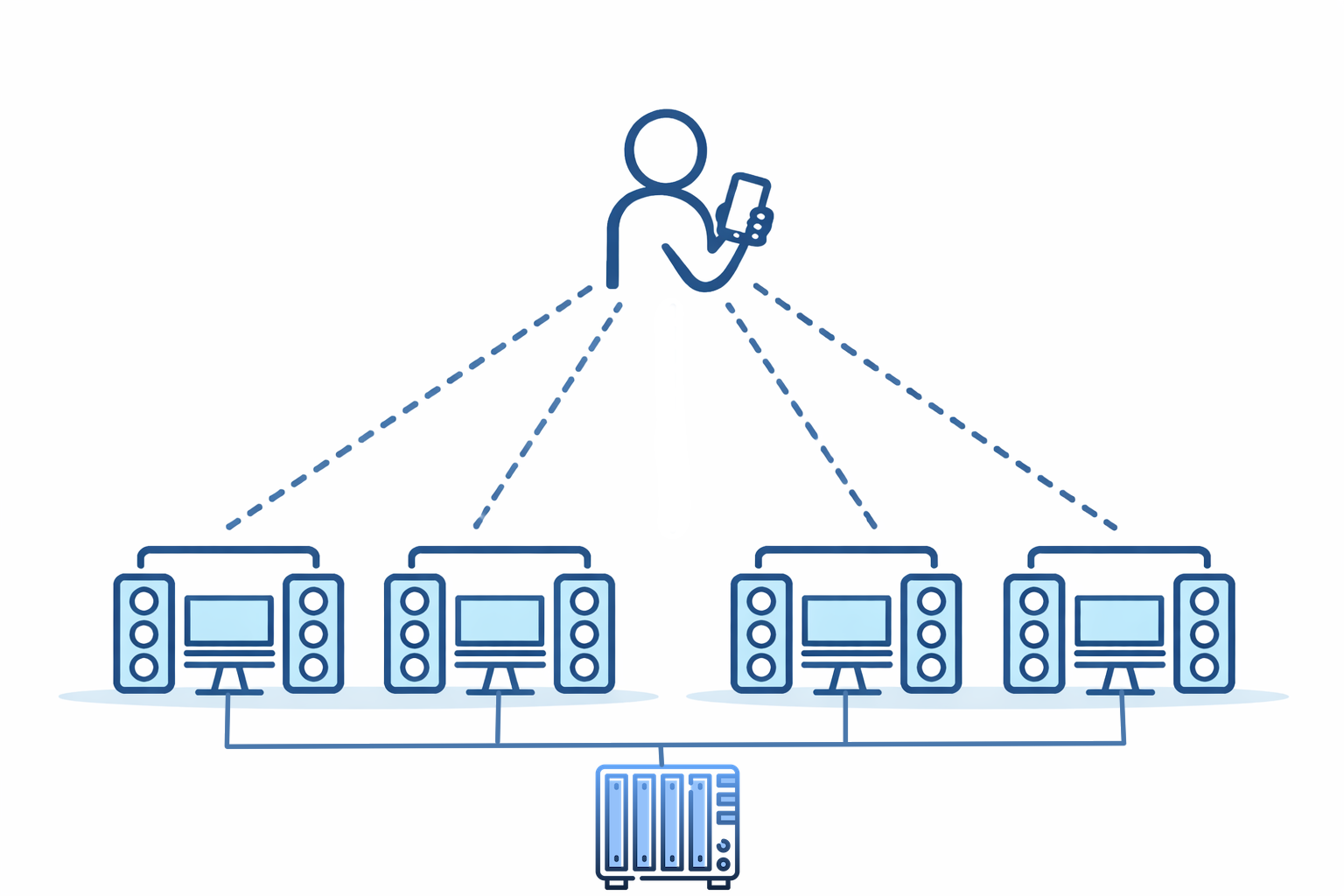
A person with a mobile device can ssh into multiple PCs, each running Giocoso and each with output available to speakers. Each of these 'playing PCs' is network-connected with NFS to the NAS box that contains my music collection: in this way, music can play in multiple rooms in the house. This is a first step to achieving “music portability” around the home: the ability to initiate music playback from an ssh connection is important to making this happen.
The drawback to this approach is one I’ve already hinted at: I have to ssh into each playing PC separately and each playing PC has to have enough compute resource to run Giocoso; each also has to have its own NFS connection to the music collection. Neither are particular intractable issues, but editing /etc/fstab to create a mounted NFS on multiple devices is a bit of a pain; and (especially of late) computers with screens, mouse, keyboard, RAM and decent CPU are not available at quite the bargain-basement prices they once were!
However, there is also the possibility of this sort of configuration:
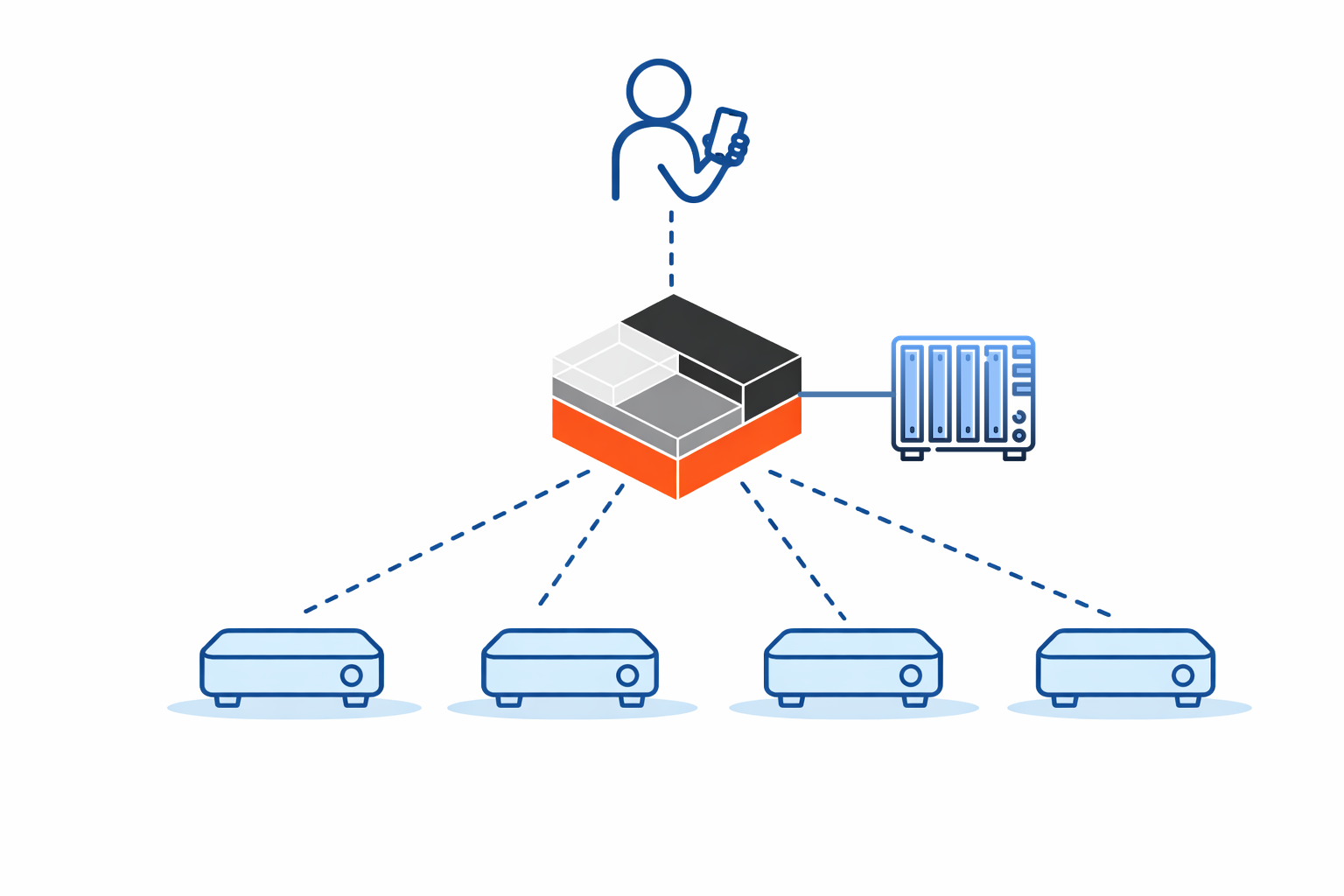
In this model, we have someone using a phone to control a single PC or computing device (and I’ll come back to the distinction between those two things in a moment!). It's the only computer connected to the NAS; it's the only one with sufficient compute resources to be able to run Giocoso. It is, in fact, the only PC running Giocoso! Somehow, however, this one 'playing PC' is pushing its audio output to four remote PCs over the network: these devices are mere ‘receivers’ of music, not players of it themselves. A subtle point being made in this diagram, too, is that the four ‘receiving’ devices are pretty minimal: they don’t have a screen, keyboard or mouse. They don’t need a powerful CPU (because they’re passive receivers of a music signal, not generators of it) and they don’t need much RAM (ditto). They do need speakers attached to them, obviously: they’re no use to anyone if they can’t make the audio signal they receive actually sound out in the air! My drawing skills didn’t extend to actually showing those necessary speakers, but they’re there nonetheless 
But this prompts the question: how can this configuration possibly work? How can a ‘music receiver’ that lacks the ability to itself run Giocoso nevertheless receive audio from that single PC controlled by mobile phone over ssh? From the opposite perspective, how can that one directly-controlled computing device push its audio data over the network?
The answer is PulseAudio. It does for audio what X11 does for graphics: separates the creator of something from the presenter of it. With X11, you have a program that wants to draw a form or document on a monitor running on one PC and a second PC that actually has a screen attached to it is able to render the depiction of that form. With PulseAudio, a similar division of labour can exist: the one PC connected to the NAS wants to generate audio and the four playing devices have audio hardware that can actually make that audio sound out into the physical world. The beauty of this is that the hardware needed to generate audio data only has to exist in one place; the playing devices can be very lightweight things because they're not actually doing the generating, just the 'sounding out' of a passively received audio signal. You could have an ancient computer running with 1GB RAM and an asthmatic CPU playing excellent quality music, provided only it's hooked up to a decent pair of speakers.
It is to facilitate this sort of 'distributed music playing' that the new feature in Giocoso Version 3.36 that I mentioned last time kicks in. As a reminder, the new feature is the Giocoso mini-player:
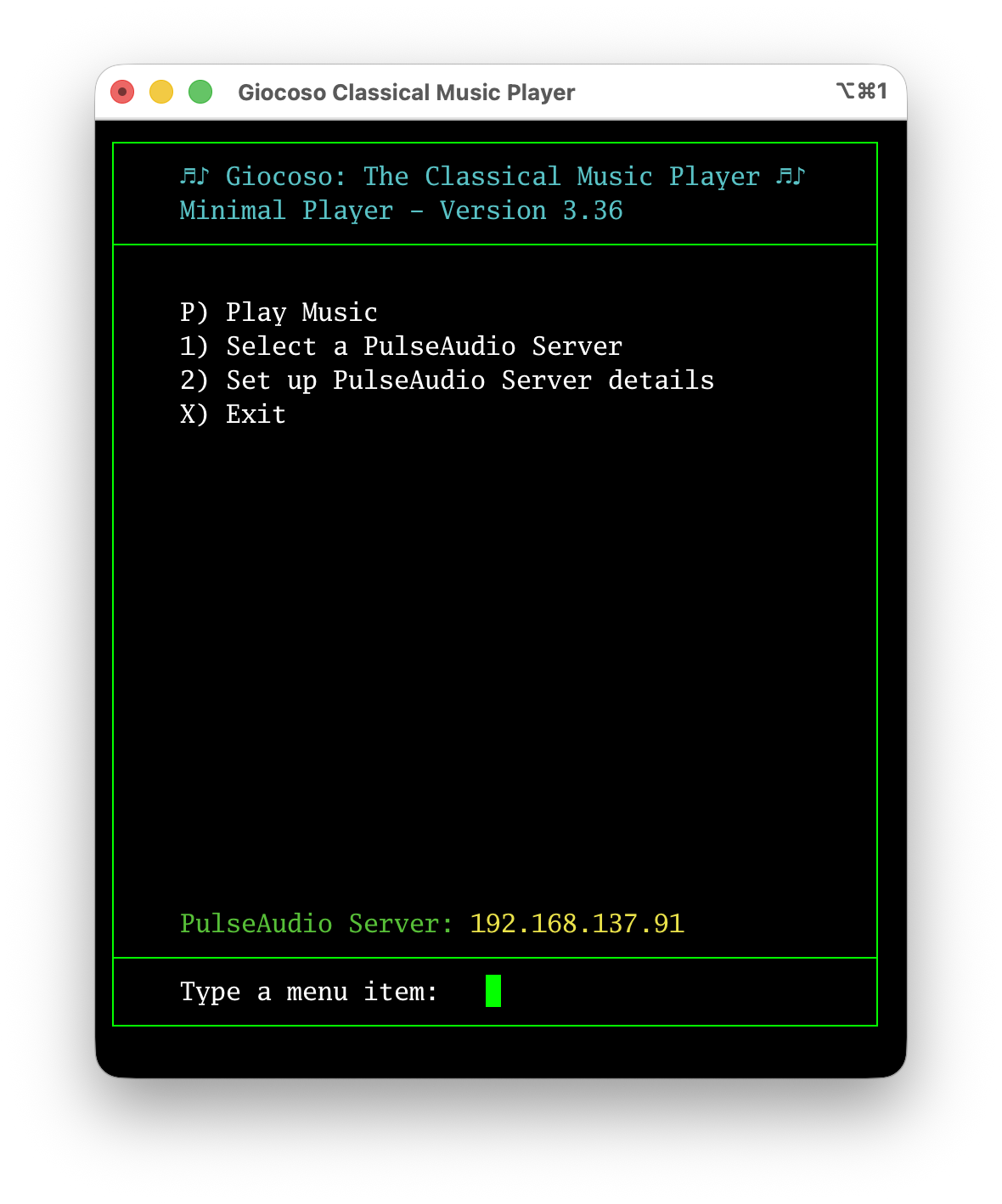
It runs on a computer that has full-blown Giocoso installed on it, but its program display is in portrait mode and limited in width, without graphics, so it runs perfectly on a mobile device that is merely connected to the Giocoso player PC via ssh.
The point this time, however, is to note the Option 1 and Option 2 menu items: these let you set up a number of PulseAudio ‘sinks’ and then select one or other of them as actively in use. Here’s what you see when you take Option 2, for example:
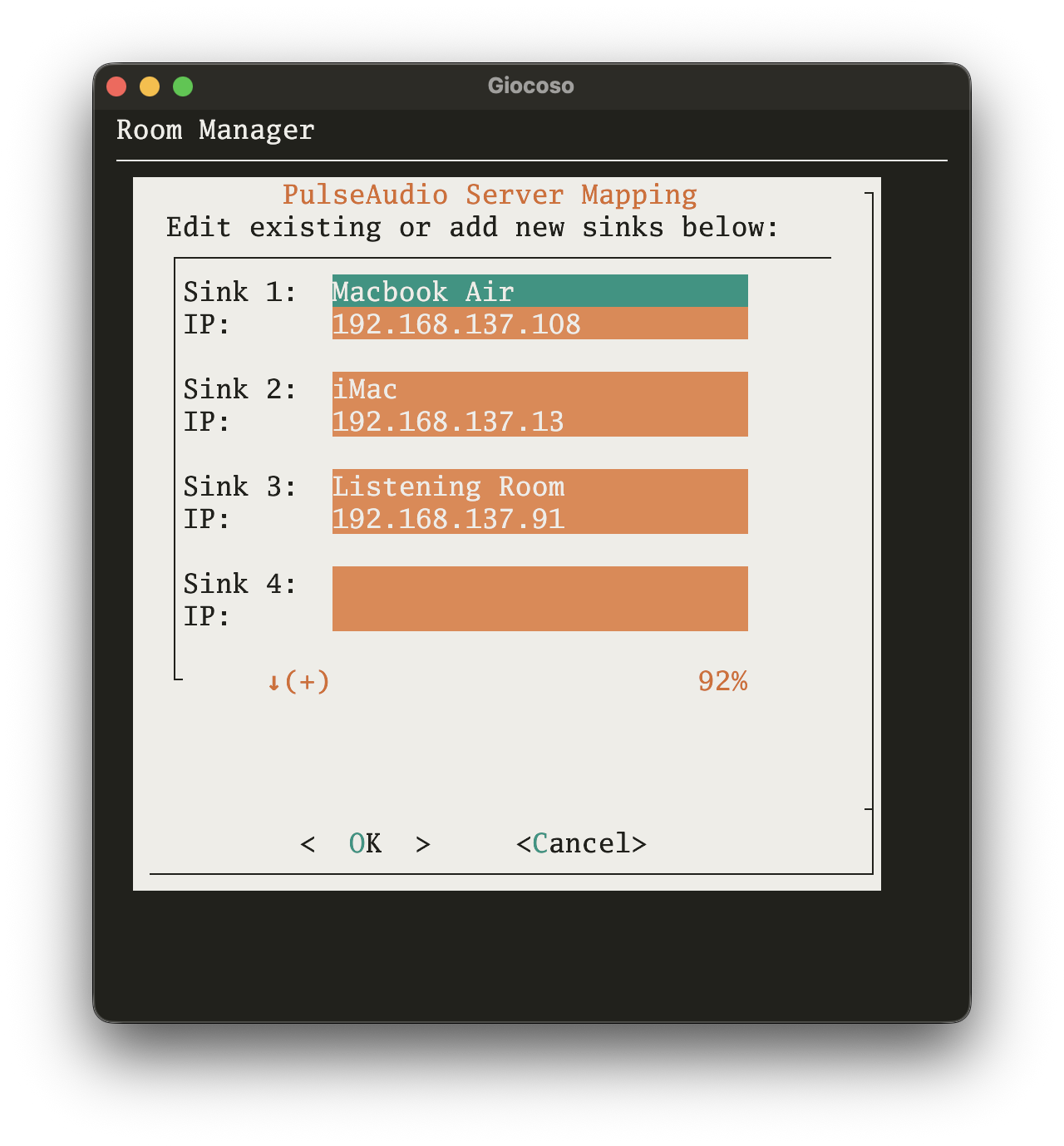
You’re allowed to create up to five ‘sinks’ on this screen: their labels are up to you, but must be less than 14 characters long (they’ll be truncated otherwise). Each label is then paired up to the IP address of the device to which the label applies. Those rather obviously need to be fixed IP addresses (or, at least, addresses with DHCP reservations) so that they don’t change after initial setup: Giocoso on the playing PC needs to be able to find it on the network so that the audio can be sent to the right place.
Once you’ve built a library of possible PulseAudio sinks in this way, you can take the mini-player’s Option 1 to select a particular one of them to send audio to:
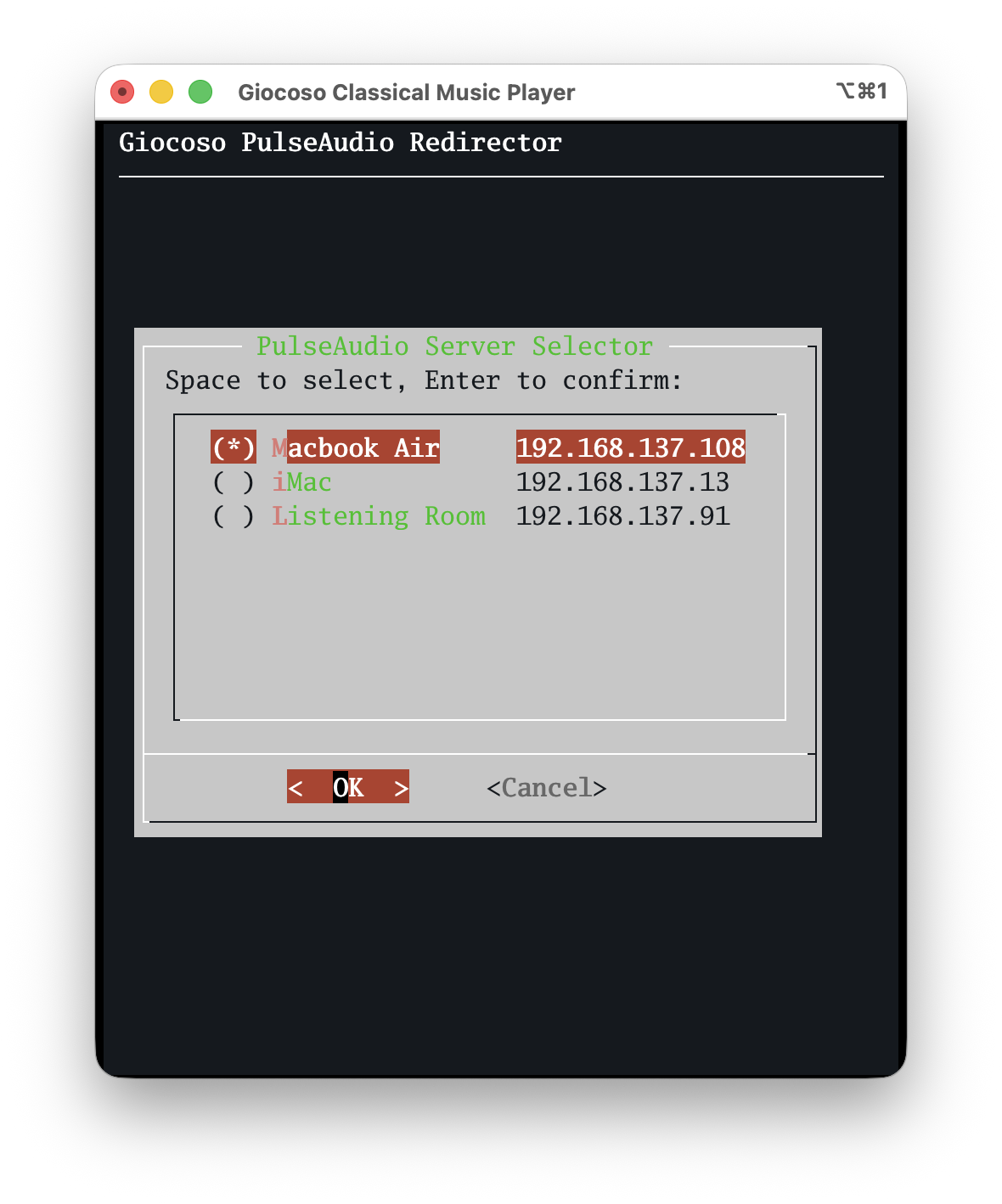
The current audio ‘sink’ is marked with an asterisk; your job is to up and down arrow through the list of available sinks and press the Space Bar when you’re sitting on the item you want to use for the next play: that press of the Space Bar will make the asterisk jump to that item, indicating selection success. Press [Enter] to make the new selection ‘stick’. You’ll be returned to the main mini-player menu where, towards the bottom of the screen, you’ll see confirmation of the currently-selected PulseAudio server: if you then tap the ‘P’ option to play music, it’s this IP address to which music will be directed.
To be clear, for any of this to work, the persistent configuration parameter Force the use of PulseAudio must be set in full-fat Giocoso’s configuration settings:
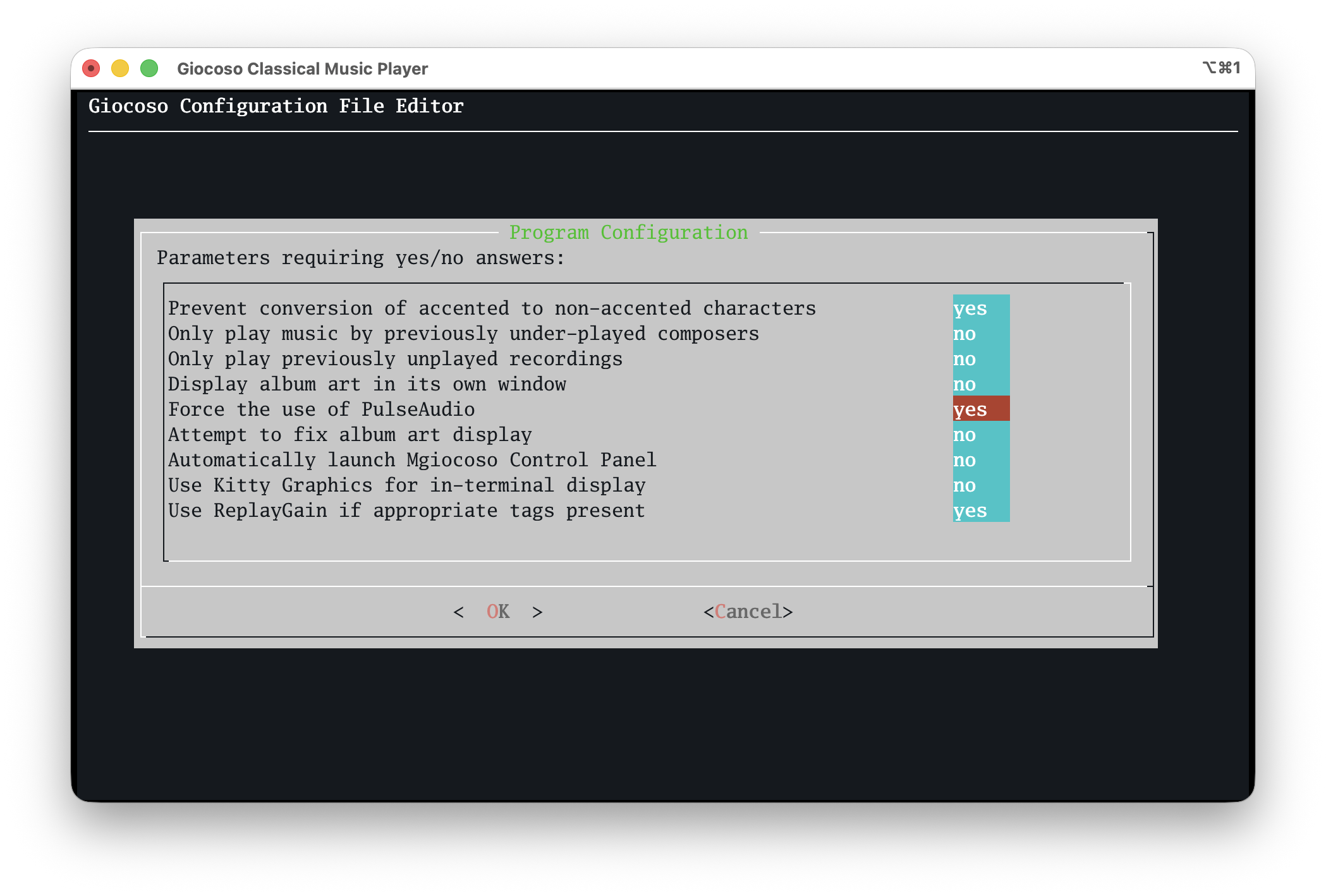
If you haven’t set that parameter to “yes”, then specifying a PulseAudio server to play to simply doesn’t work: audio will ‘sound’ on the PC you’re directly connected to, assuming it has speakers to use! It should also be obvious, I hope, that this can only work if your player PC and the devices it sends audio to are all configured to use PulseAudio (or its cousin, PipeWire, which is essentially the same thing as far as these purposes are concerned). Most Linux distros ship with PulseAudio out-of-the-box and very little, if any, configuration is needed to make them players or sounders. MacOS can also act as a PulseAudio client and server, though things get much more complicated there: I’ll have specific documentation prepared for this topic shortly.
The little secret ingredient I haven’t mentioned until now, too, is that the box doing the Giocoso playing and sending its audio out to ‘sounding devices’ doesn’t have to be a big PC. There’s a reason it was drawn in that earlier diagram with this logo:

That is the official logo of the LXC or Linux Containers project. What is an LXC container? Well, it’s sort-of like a virtual machine, running on a Proxmox hypervisor, but incredibly minimal and lightweight: I have an Arch one configured to use just 2GB of RAM, 8GB of hard disk space and two virtual CPUs. It runs nothing much more than standard Giocoso, configured to use PulseAudio. I ssh into it and, using the mini-player interface, direct it’s audio output to whichever one of my minimalist room setups I need to hear music from at the time.
It is quite complicated to get an LXC container to connect to my music NAS; it is even more complicated to get an LXC container to ‘see’ the physical music playing hardware that the Proxmox host has. Documentation on getting all that working is in preparation, too.
I hasten to add that none of this affects how you use Giocoso if you don’t want it to! All my ‘serious’ music listening happens in my dedicated ‘listening room’: that contains a passively-cooled PC hidden away in a draw, physically connected via optical-out to a full-on DAC and amplifier. I ssh direct into that machine and run full-fat Giocoso on it from my iMac desktop: there’s no PulseAudio involved at all there… and I wouldn’t want it to be!
The new features in version 3.36 of Giocoso simply means that it’s now easier than ever to have less-serious listening follow me about the house, if I want it to: I ssh into the LXC container and direct its output via PulseAudio to the lightweight playing device in whatever room I’m working in at the time. In my garden shed, the playing device is literally a Raspberry Pi 3B playing wirelessly to a small Bluetooth speaker: I’m not expecting great hi-fi fidelity from that setup and sending audio via PulseAudio and Bluetooth therefore doesn’t degrade anything below my already-low expectations! It is enough, however, to have music follow me around the house at will… or, at least, at the touch of some keys on my mobile phone