Table of Contents

Changelog
This page describes the changes made in each point release of Niente since its first release as version 4.00 on September 10th, 2024.
Versions with dates attached have been released into the wild and made generally available: if an entry says 'proposed for release', it's a best-guess as to when a release will happen, but it's not guaranteed to actually happen on that date. It could slip a few weeks, or even happen earlier than scheduled, depending on circumstances.
Niente Version 4.04 - February 28th, 2026
This is a significant release for Niente. The key areas to focus on are:
- Running on macOS (now a Tier 1 supported platform)
- Running on Almalinux 9 and 10 (similarly, both are now Tier 1 supported platforms)
- Visually more appealing screens when performing long-running operations
- All reporting now done by output to HTML documents, viewable in a separate browser
- Making it ReplayGain aware
Some specifics:
Major Enhancement: Niente has been significantly re-written and re-factored to ensure it runs on macOS (tested on Tahoe on Apple Silicon and Monterey on Intel) and on both Almalinux 9 and 10.
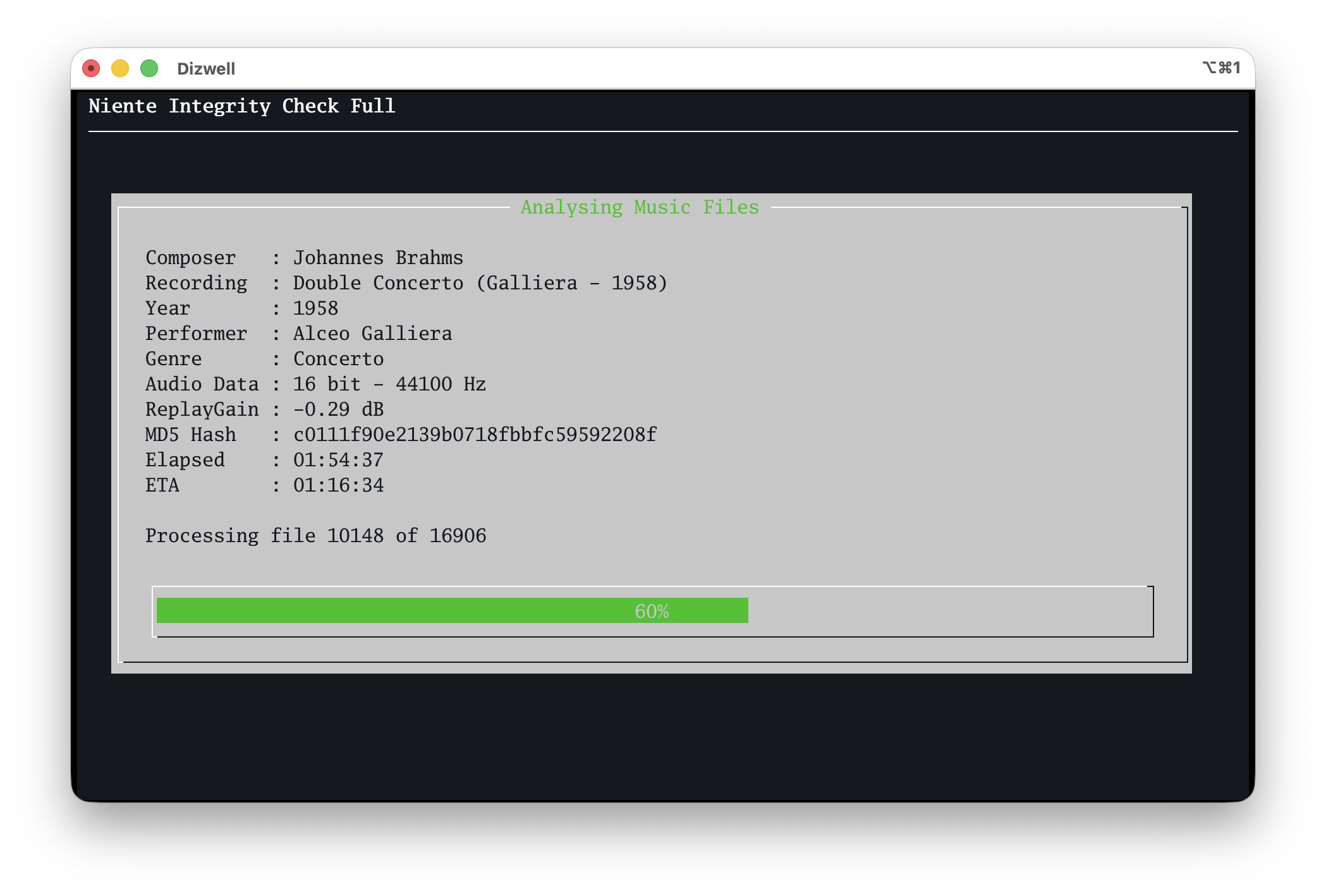
Visual Appearance: When performing long-running operations, such as performing an integrity check, a volume boost scan or a check of album art, Niente will now display progress with screens such as this:
Compare that to how it looked in the previous version:

Many such screens now have a graphical progress bar and an “ETA”: an estimate (in Microsoft fashion, typically wildly wrong at the start of whatever process is being performed!) of when the operation is likely to take to complete.
Significant Enhancement: All Niente's reports are now produced as (hopefully!) professional-looking, responsive HTML documents in a web browser (from where they can be printed or exported to text files):
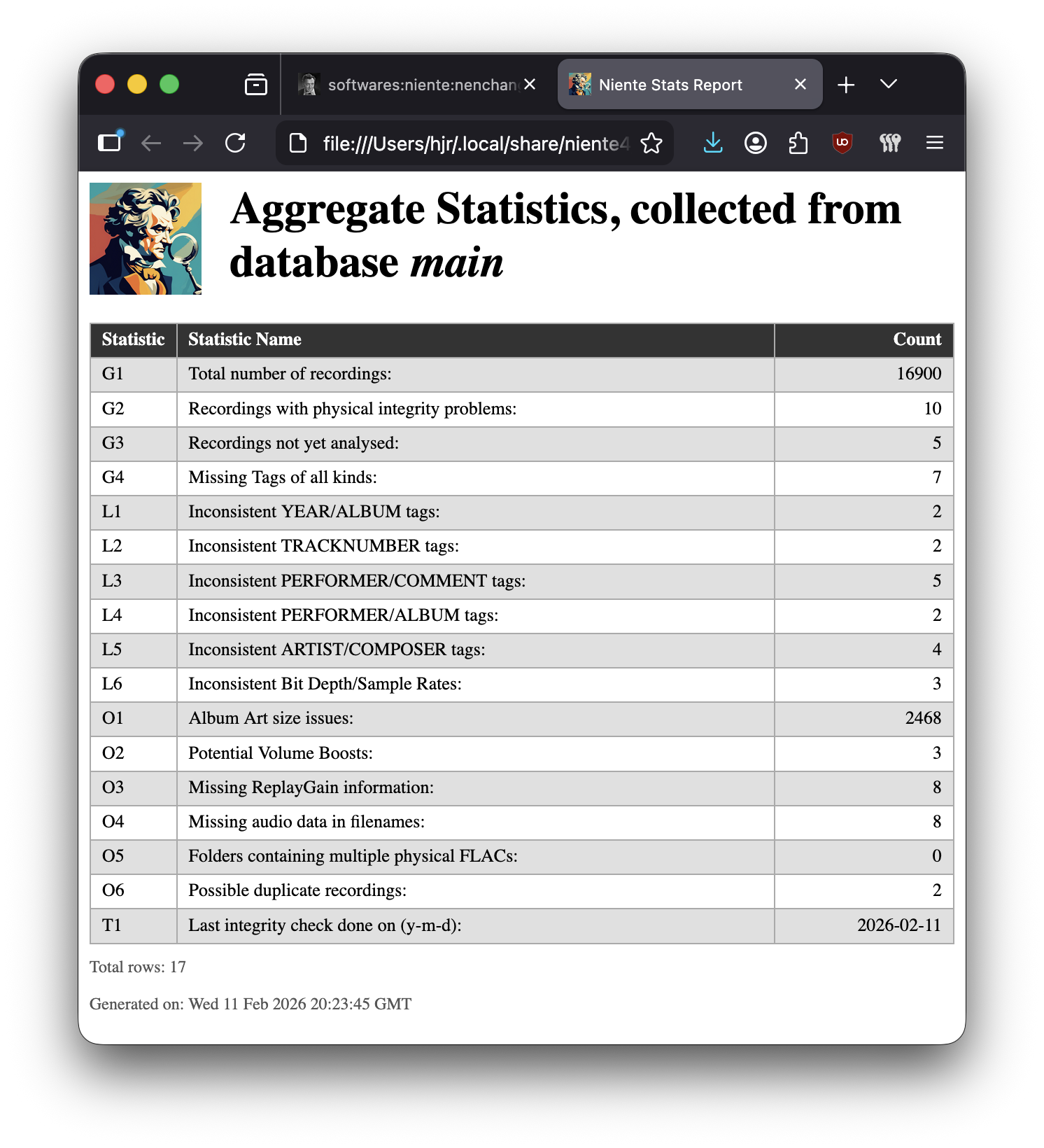
Every report has been overhauled to make the SQL more robust logically and additional items in the Other Reports menu mean that items on the Aggregate Statistics report have been renumbered correspondingly.
Removed Feature: Since all Niente's reports are now produced via a web browser, there is no need to configure a “Default terminal font (for reports)” in the Administration menu, Option 1 : Edit Configuration File. That configuration item has therefore been removed and, if the parameter is supplied by manually editing the configuration file, it is simply ignored. The same is true of the 'Default font size (for reports)' parameter.
New Feature: A new configuration option to specify a Preferred browser has been created. This can be set to be the name of any web browser executable installed on your system (for example, 'firefox' or 'chromium'). This will then be the browser Niente tries to open its reports with. If you name something which doesn't exist, your system's default browser will be used as a fallback option. The same is true if you don't add a value to the new parameter at all. Leaving it blank is actually the default value, too: it's probably safer and more reliable to open reports with the system's default browser than to attempt to name a browser executable that might be wrong or may not behave well in conjunction with Niente.
Enhancement/New Feature: When performing an incremental search for new music files (Database menu, Option 3), a new check is performed to ensure that the folder being scanned for new files isn't, in fact, substantially empty. If the selected music folder contains less than 80% of the records already in the database, that suggests something odd might be happening with the music folder. Rather than just go ahead and scan (and thus bulk-delete apparently now non-existent music files from the database), a warning message will be displayed. If you select 'yes' to continue, fine: the scan will proceed. Any other response will abort the proposed incremental scan. For example, if your NAS mount failed to mount following a reboot and you hadn't noticed this before attempting an incremental scan, this might help prevent the accidental wiping of all your database records.
Enhancement: Niente is now “ReplayGain aware”. Whenever a new integrity check is performed, the program will search for the presence of the REPLAYGAIN_ALBUM_GAIN tag inside each FLAC being analysed. If found, it is written into Niente's TRACKS table. Collecting such data would be a bit pointless by itself, so to complement this new data, there's a new report: under Other Reports, a new option to produce a report on “Files missing ReplayGain data” has been created. Anything listed on that report might be a candidate for opening in Semplice and performing a metadata-only volume boost!
Bug Fix: Niente hasn't been updated since April 2025: it was thus unaware of the existence of bbritten.com and kept trying to phone home to absolutelybaching.com: updates wouldn't work as a consequence. This release itself actually suffers from that: a fresh installation is potentially the only way to obtain it in an automated fashion, as the menu option to update will look to the wrong server to work out if an update is available. Various other bits and pieces would fail for similar reasons: these have all now been fixed and the software points to this website's servers correctly once more.
Niente Version 4.03 - Released April 10th, 2025
- Enhancement: whenever the program displays the database name, it truncates the name to just 10 characters. That's now been increased to 25. It's a purely cosmetic issue. On certain occasions, the name is still truncated to 10 characters for space constraint reasons. Whenever Niente needs to constrain the database name, it will now add an ellipsis to the name to indicate that display truncation has occurred (i.e., you'd see something like “My_long_da…” when it's working with a database called “My_long_database_name”).
- Enhancement: a new column called TRACKTITLE is now populated in the TRACKS table whenever any sort of integrity check is performed, thereby storing each track's TITLE tag. This will allow advanced users to run SQL queries against the Niente database and discover logical integrity issues such as tempo markings being spelled incorrectly (Adajio, for example; or Vivahce). No provision for making such checks in-program is planned, however (though see new Option 4 on the Reporting menu, below). Note that the upgrade process merely creates the new column: it doesn't populate it. The new column will only get populated if you go on to do a new integrity check.
- Bug fix: In previous Niente versions, if you try to create a database that already exists and, when warned about this, you press the option to 'Cancel', you end up with Niente running without being 'attached' to any database at all. You could always fix this by manually opting to 'Change Working Database' back to what you started with, but you shouldn't really lose the database you were working with just because you cancelled an operation! This is now fixed: you don'tnow lose contact with your original database when cancelling out from the creation of a new one. If you are working with database X, attempt to create database Y and then cancel that operation, you will return to the main menu 'attached to' and working with database X as before.
- Enhancement: In line with the way Giocoso has worked for some time, if you press [Enter] on any of Niente's main menu options, the first listed menu option will be executed. In other words, sit on the Database menu and press [Enter] and it will be as if you pressed '1' to create a new database; sit on the Reports menu and press [Enter] and the General Reports sub-menu will be displayed (and another [Enter] after that will trigger the running of the 'Aggregate Statistics' report); and so on.
- Enhancement: A new Option 4 on the Reporting menu allows you to type in complete SQL statements and thereby query any combination of columns in any of the tables contained within the currently-selected Niente database. It doesn't replace the functionality inherent in programs such as Sqlitebrowser, but it does mean a basic dynamic query functionality is now built-in to the main Niente program itself. Deletes and updates via this mechanism are not permitted, however. Report contents are displayed in a separate xterm window, in the same way that existing 'non-advanced' reports are.
- Bug Fix: In previous Niente versions, the statistic for files capable of being volume-boosted would disappear off the aggregate statistics report, regardless of whether you'd configured the 'Report on volume boosts' to yes or no, every time you performed a new 'check for volume boosts' integrity check. Now fixed: the statistic is either there or not, correctly, as specified in the configuration file. Performing new integrity checks does not make the statistic disappear.
- Minor Enhancement: The Administration menu, Option 2 was used to download a copy of the GPLv2 licence from this site. If this site was down for maintenance, that would lock up Niente for the duration! The new version now only downloads the licence once, if it's not already present on the system. It also now displays it within a quasi-graphical text viewer, rather than with the command line 'less' program.
- Bug Fix: In rare circumstances, the file that tells Niente to use grep, sed and similar utilities was not populated correctly before attempting to use those utilities to parse text information extracted from FLAC file tags: garbled data resulted. Now fixed.
- Bug Fix: A feature introduced in Version 4.01 could result in a blank database file being created on merely launching Niente. The existence of this non-database file would then prevent you from creating an actual database file of the same name. Now fixed.
- Bug Fix: For unaccountable reasons, Niente forgot to install sqlite3 on Fedora; other distros were not affected. This meant that fresh installs on Fedora would “work” to let you create a database …and then promptly lose all trace of the database after it had been 'created' (because it hadn't actually been created at all, given the necessary software to do so was missing!), preventing all further use of it. Now fixed.
Niente Version 4.02 - Released October 12th 2024
This release implements a bunch of small bug fixes, mostly to do with how the 'non-interactive' Niente operations are performed. For example, if you run the command niente4.sh –check-differential, you'll trigger a non-interactive differential integrity check: non-interactive because the main program window is not displayed as the check is performed. It (and its cousins) are intended for scheduling program functions via crontab. Unfortunately, the necessary environment variables were not being set correctly when these options were invoked and thus not-so-minor things such as extracting the correct bitdepth and sample rates from FLACs were not being performed correctly. I also took the opportunity to add some 'progress dots' to the program output when in non-interactive mode: though you're not likely to see them when the program is run via cron at 3AM, the total lack of progress indication or output hitherto can be a bit unnerving when you're testing things! Now you'll see this sort of thing:

Niente Version 4.01 - Released October 8th 2024
For this first update since it's release, an enhancement has been made to the Niente database, such that it will now contain a column called SAMPLE_RATE in the TRACKS table. Existing databases will have the new column appended to the end of all the existing columns; freshly-created new databases will have the extra column embedded within the other columns. The adjustment to the table structure happens automatically the first time Niente is run after the software upgrade has been applied. Actual population of the new column with data only takes place once a new full, differential or fast integrity scan has been performed. (Note: a Niente database is not particularly significant, since it can be completely re-constructed by doing a fresh database creation, music scan and integrity check. This may take time, but it means the data in a Niente database is essentially fungible. Should you prefer, for example, you can simply delete your existing Niente database, create a fresh one and trigger fresh music scans and integrity checks to get the new column installed and populated 'properly'. It's a fundamental tenet of database normalisation theory, however, that the physical location of a column in a table is irrelevant for working with that table, so Niente won't care whether the new column is integrated within the table structure or appended to it).
SAMPLE_RATE is the counterpart to the BITDEPTH column, which has been there since Version 2 or thereabouts: for any given digital music file, Niente will record it as being '16' or '24' bit-depth as before, but will now also record whether the music has been sampled at 44,100Hz (standard CD Audio), 48,000Hz (enhanced standard CD), 88,200Hz (high resolution digital audio) or even 192,000Hz (bonkers resolution for those with more money than hearing discrimination). Of course, if any other sample rate is detected apart from these 'standard' ones, that will be stored too. This enhancement was suggested by a reader, Scott, to whom I'm grateful for the idea, though it now escapes me why I never considered capturing this data before: its utility is rather obvious, after all! For example, the first thing I was able to do (in sqlitebrowser) was to filter my rows like so:
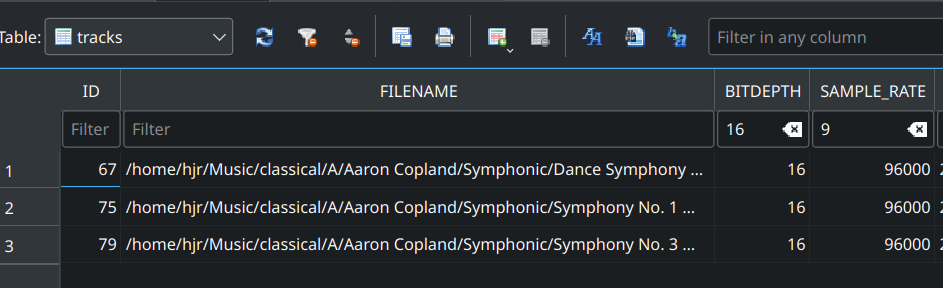
Here, I'm filtering for recordings which have a 16-bit bitdepth (which you'd normally expect to be standard CD audio) but also have a 96KHz sampling rate (which you'd expect from SACD rips or online high-res sources). That particular combination is so bizarre that I can only conclude that some CD ripping and/or post-processing has 'gone awry' in some way. Not that this is easily fixed, but knowing about this at least means I now know that a re-rip of the relevant CDs is required. Thanks Scott  …</joke>
The new data is displayed whenever a Niente database is undergoing an integrity check:
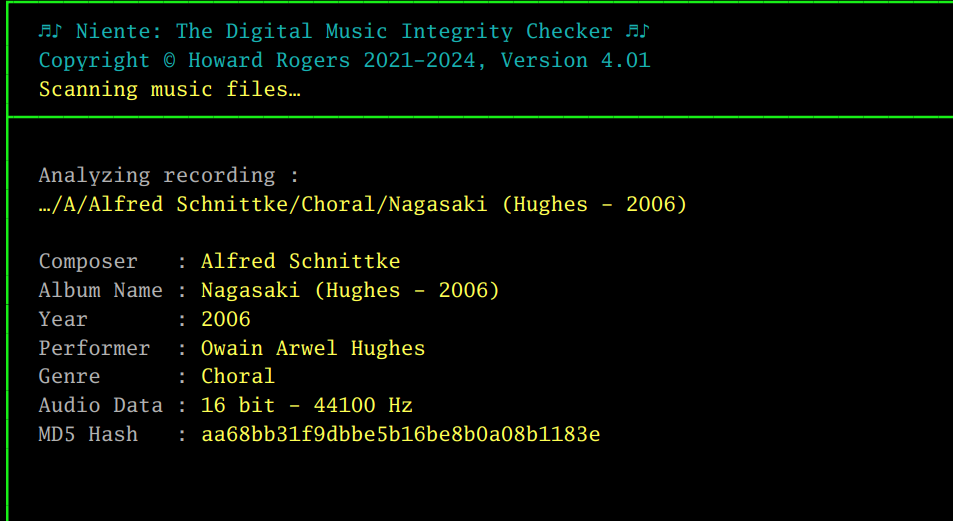
The new line 'Audio Data' displays both the bit-depth and sample rate determined by physical analysis of the digital music file's contents.
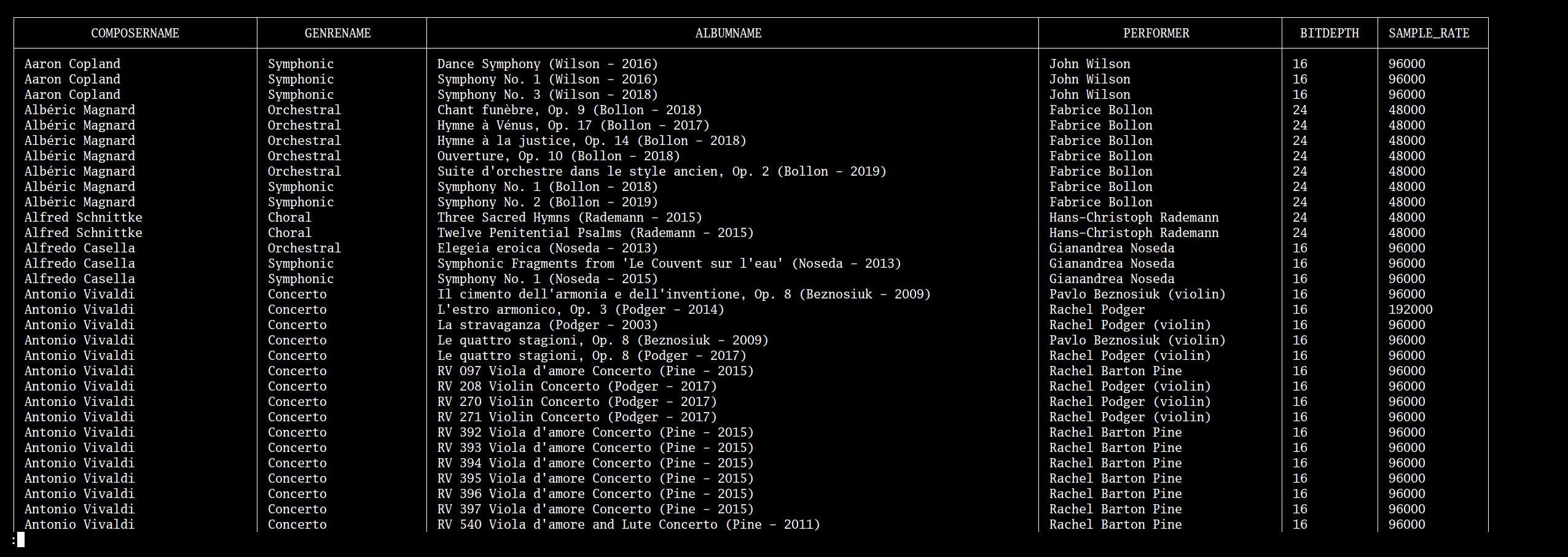
To complement this new data collection, a new 'Logical Problems' Report item has been created, displaying digital files for which the sample rates and bit depths don't appear to be sensible combinations.By “sensible”, Niente means: if bitdepth is 16, sample rate shouldn't be higher than 48KHz (48,000 Hz); from the opposite way of looking at things, too, if the bitdepth is 24, the sample rate shouldn't be lower than 48KHz.
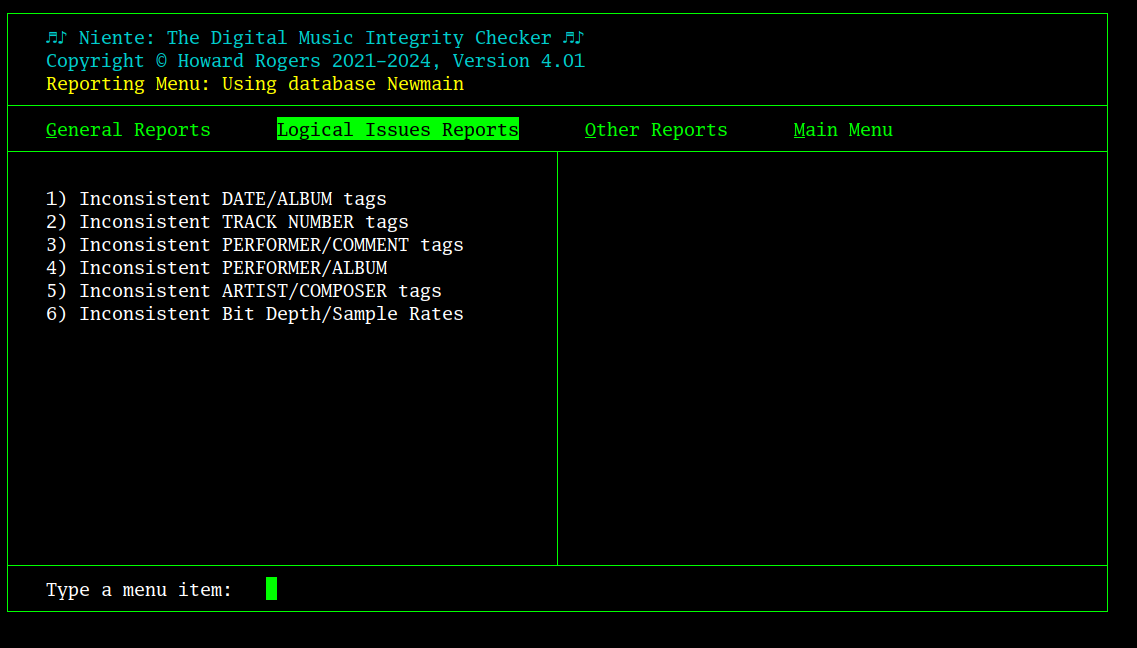
The new report is accessed from the Logical Issues Reports, Option 6 “Inconsistent Bit Depth/Sample Rates”:
The resulting detailed report contains content such as this:
The Aggregate Statistics Report (General Reports, Option 1) has been adjusted to report on the row-count of this report:
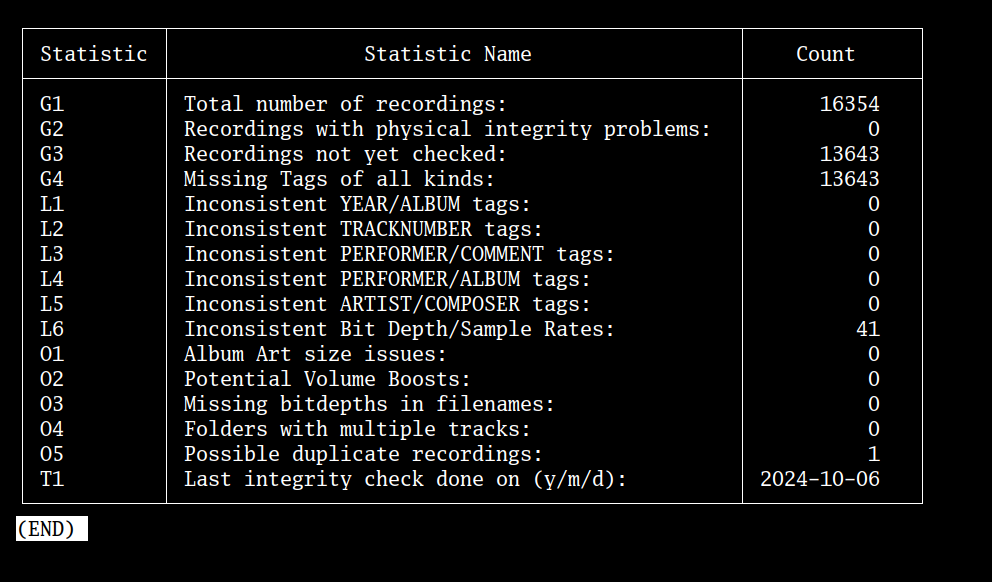
The new line on the report is the 'L6' one. Bear in mind that it is at least conceivable that a 24-bit, 44.1KHz recording exists, so that a number on this line of the aggregate statistics report doesn't necessarily represent a real problem (though, personally, I would definitely re-rip to more standard bitdepth/sample rate combos). Niente is just hard-coded to apply the rule that “either 16 bits and sample rate greater than 48KHz; or 24 bits and sample rate less than 48KHz equals 'odd'”. I'm open to further enhancement requests if a finer-grained selection of bit depth/sample rate 'problems' is felt necessary :)
Finally, a cascading and corresponding change has been made to the 'O3' line on that aggregate statistics report and its equivalent Other Reports, Option 3 Files missing bitdepths in names detailed report. In the original Niente release, the program looked for the bitdepth number in the file name, and if it found it, said 'fine, you've included the bitdepth in the name correctly'. It never actually checked for the presence of the sample rate in the file name at all, though!
In other words, it assumed that if “24” or “16” was in the file name, you must have named things correctly and the sample rate was probably in there, too… but it never verified this. Of course, this meant that a 'Symphony No. 16.flac' would pass the test: if the file was a 16-bit FLAC, the presence of '16' in the file name anywhere would count as a pass (and yes, I knew this was a bit of a hack-job when I wrote it: I was in a hurry, I think!)
In light of the new collection of sample rate data for music files, therefore, the rules for this report have been tightened up. The new version of the report knows both the bitdepth and sample rate from the Niente database: it expects them to be concatenated with a hyphen when constructing physical file names (as Semplice, for example, would do for you automatically), so the report now looks for things that don't have text such as '16-44100' or a '24-88200' in their file names. A 'symphony no. 16.flac' would thus now fail the 'do you have bitdepth and sample rates in your filename' test, as it absolutely should, where previously it would have passed it. Even a file called 'Symphony No. 16. - 44100.flac' would fail, as the program expects 'xxxxx-16-44100.flac' as an absolute pattern, though other bitdepths and sample rates are acceptable, depending on circumstances!)
| Back to Software Home | Back to Niente Documentation Home |