Table of Contents
Giocoso and ReplayGain
1.0 Introduction
 ReplayGain (the Camel Case spelling is obligatory, I'm afraid!) is a standard developed back around 2001/2002 as a way of normalizing 'perceived loudness' when playing back digital music files. In essence, the aim was to have all the tracks on an album play back at around the same sort of volume level so that you weren't constantly fiddling with the volume control on your amplifier. It was cooked up, originally, by Joachim Heintz and Florian Fricke, primarily for use with MP3 and Ogg Vorbis file formats, but it soon spread to other audio codecs and can be employed perfectly well by FLAC players, too.
The traditional way of normalising volume was to scan through your audio files and discover their peak loudness: if that was significantly below 0dB (the traditional way of describing maximum, non-distorting volume) you would boost the volume in your audio file until it did reach 0dB, or close to it. This is, indeed, the way Semplice did all its volume boosting for the best part of half a decade. It's still a valid way of doing it but, because it's driving off transitory bursts of volume, it might leave 'volume on the table' as it were. A quiet piece with fleeting seconds of loud cymbal crashes would remain extremely quiet, because those crashes would leave little room for much volume boosting.
ReplayGain uses black magic clever acoustic analysis to analyze the overall 'perceptual loudness' of a track, rather than concerning itself with transient peaks. It computes a volume boost sufficient to bring the overall loudness up to a reference loudness of 89dB. The effect is basically the same: your music volumes get adjusted so that you don't have to keep fiddling with the volume knob on your amplifier, but it's done in a subtler way than peak-driven boosting.
ReplayGain can be done on a per-track basis, or on a per-album basis. That is, given a four movement symphony, comprising four separate FLAC files, do you want to do a perceptual analysis of each movement separately, resulting in four different volume boosts? Or would you rather treat the four FLACs as part of a single entity and compute a single boost to get the symphony as a whole to a desired loudness level? I hope it's obvious that in the world of classical music, per-track ReplayGain would be a disaster! You do not want your quiet movements being boosted a lot and ending up as loud as your loud finales! Be assured, therefore, that when Giocoso uses ReplayGain it only ever does whole-album ReplayGain: each recording (i.e., composition and thus physical folder of FLACs) is always treated as a single, whole entity.
The danger with album-wide ReplayGain is that you boost quite a bit to get the symphony as a whole playing at a perceived 89dB… but those darn'd cymbal crashes still take place and spike wildly above the point where distortion kicks in! If you simply let the ReplayGain tide rise and float all boats, some transient 'masts' are going to rise to the point where they'll hit the bridge above them  There is a way to fix this, though: in the trade it's called “doing ReplayGain but avoiding clipping”. Over-simplifying greatly, having determined that you can boost a recording's volume by (say) 4dB to achieve an overall, album-wide gain, you then scale it back a bit to prevent transients exceeding the no-distortion threshold. There's actually a formula for computing this properly (brace yourself!):
safe_gain_dB=ALBUM_GAIN−20⋅log10(ALBUM_PEAK)
Be assured that Giocoso computes all that for you in the background whenever a recording begins to play, if you configure it to do so (see below). It means that Giocoso has the same sort of 'Album-wide ReplayGain without clipping“ that players like Foobar2000 can use.
One final word: sometimes, recording engineers master their recordings at exceedingly low levels for a reason. Usually, that reason has something to do with background noise which is mostly drowned out by music in the foreground but which would become noticeable if everything got volume boosted by a lot. I have several recordings in my collection that were made in Kingsway Hall, which happened to be right next to a London tube line (subway): at quiet moments in the music, there's a distinct rumble of a train passing in the background! Boost the volume of that recording and the rumble becomes extremely noticeable; left at the level provided on the CD, you probably wouldn't notice it unless wearing headphones. Another recording I have is of organ music played in Norwich Cathedral, mastered at an extraordinary -21dB. Boost that to near 0dB and you soon realise that the Cathedral must have remained open for the duration of the recording, because footsteps and people shuffling and coughing their way around the place are extremely annoying. Down at the original -21dB, however, and it's just a boomy, Cathedral acoustic that you can hear which doesn't interfere with the thunderous organ in the foreground at all. All of which is by way of saying that sometimes you don't want an enormous ReplayGain, even if the analysis and statistics suggest one is required in theory. Accordingly, Giocoso imposes an absolute limit of a +7.5dB ReplayGain: even if the numbers say a bigger boost should be possible, Giocoso won't allow one to take place.
In Summary: ReplayGain is a useful technology for making quiet music louder in a way that preserves the relative volume differences within a composition, which is psychoacoustically rigorous and justified, which is limited on the up-side to prevent over-boosting of quiet recordings and which will not introduce clipping or distortion when applied. And Giocoso supports using it -though it's optional.
Configuring Giocoso to use ReplayGain
Giocoso does not use ReplayGain by default. For it to do so, you need to take the Administration menu, Option 2 to modify your persistent configuration file:
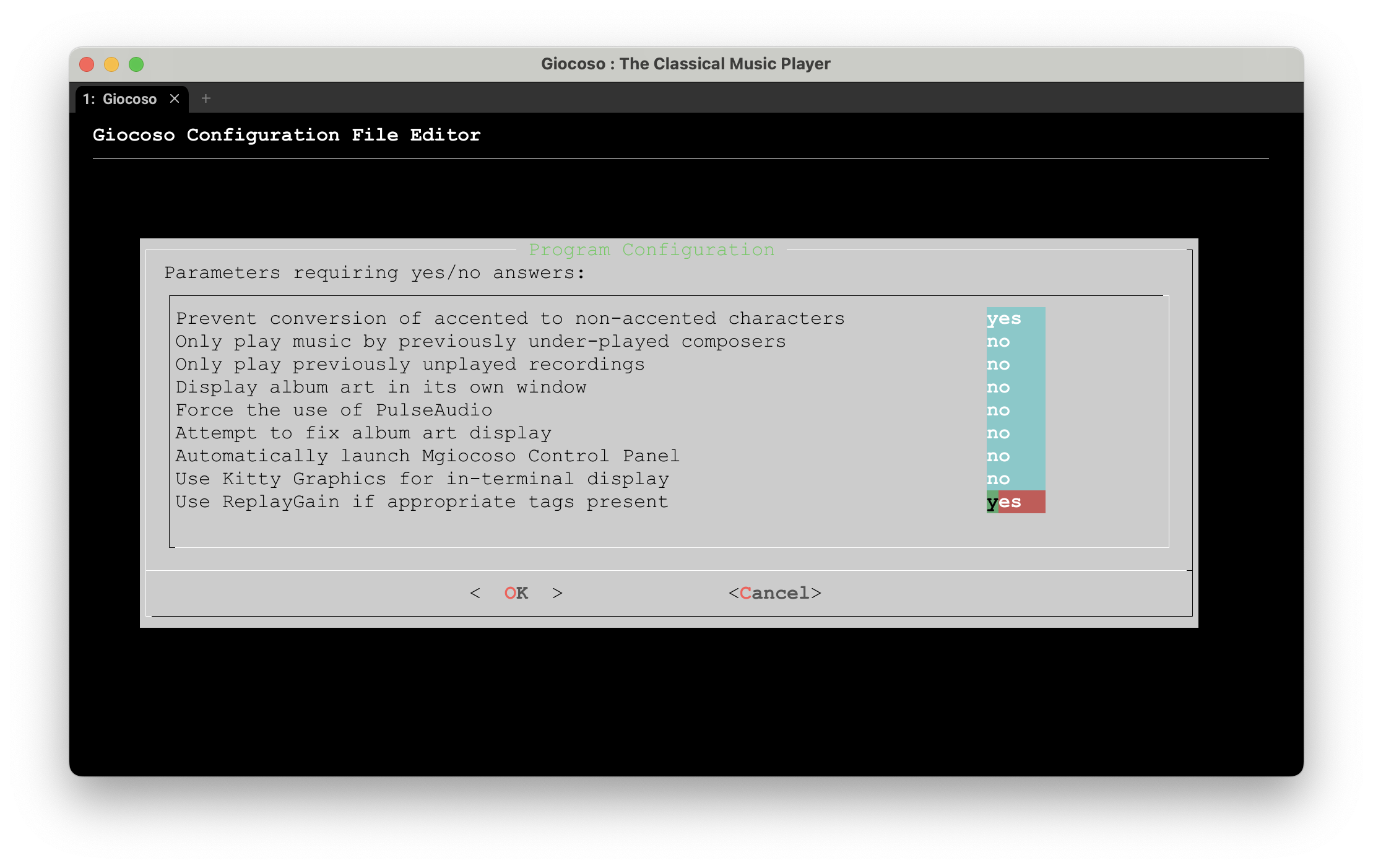
This is the fourth (and last) page of configuration options and the relevant parameter is the last one shown: Use ReplayGain if appropriate tags present. By default, that's set to a value of “no” but setting it to “yes” effectively 'switches on' ReplayGain playback. Sort of!
The issue is that Giocoso's ReplayGain 'engine' needs, as the parameter name indicates, some sort of 'tags [to be] present' before it can do anything. These are the tags in question:
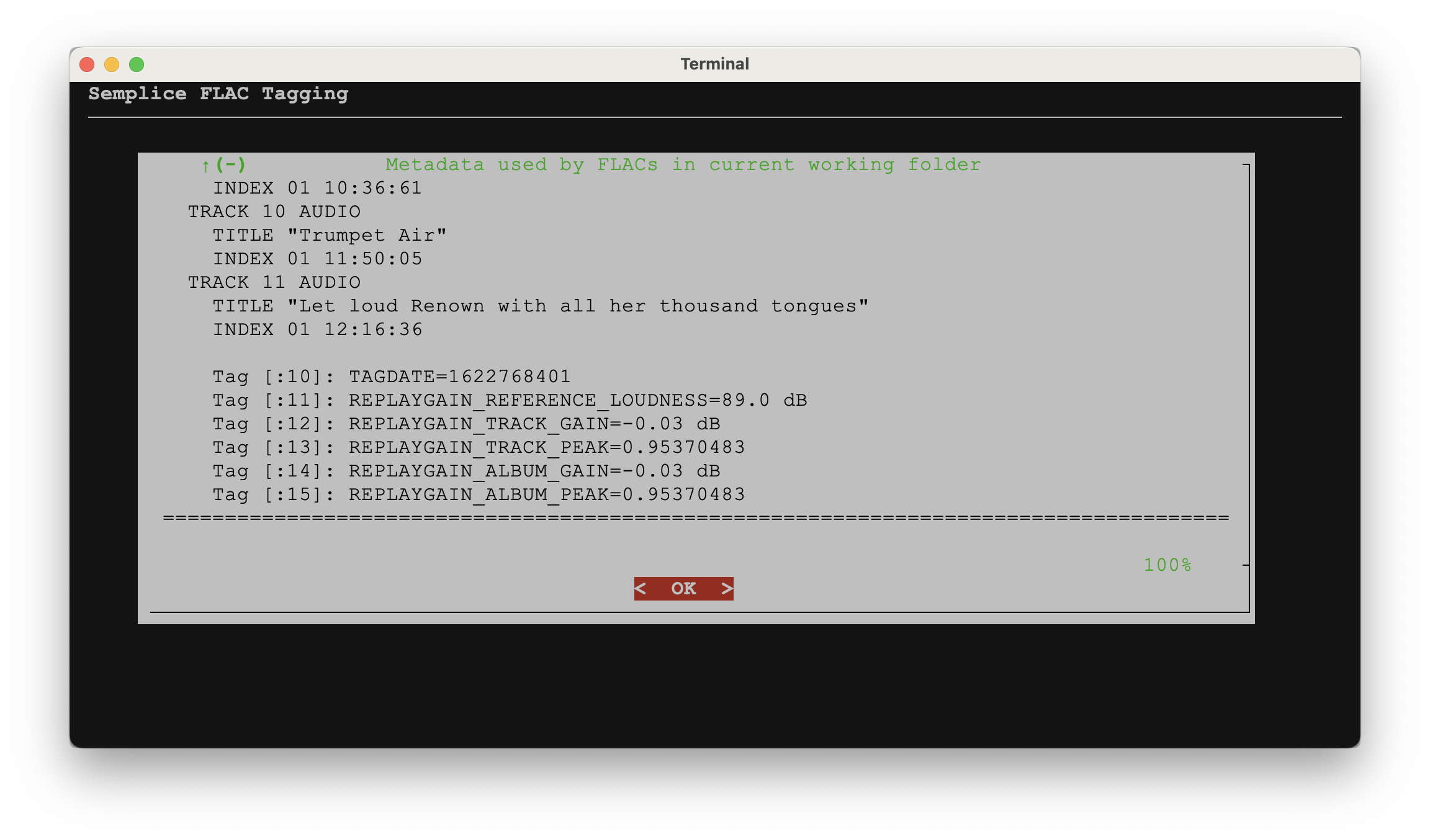
There are five 'canonical' ReplayGain metadata tags that need to be physically written into your FLAC files:
- Reference Loudness (always 89dB)
- computed Track Peak transients
- computed Track Gain volume adjustment
- computed Album Peak transients
- computed Album Gain volume adjustment
The computation of the numeric tag values has to be done as part of an analysis of your digital music files: it's something that my own Semplice program can be configured to do as part of its volume boosting capabilities, for example. Some CD rippers compute the data and write it into tags at the point of ripping the files off a CD, too. The point is that if you haven't done that sort of audio analysis and tag-writing, then switching the Giocoso parameter to use ReplayGain will have no effect:
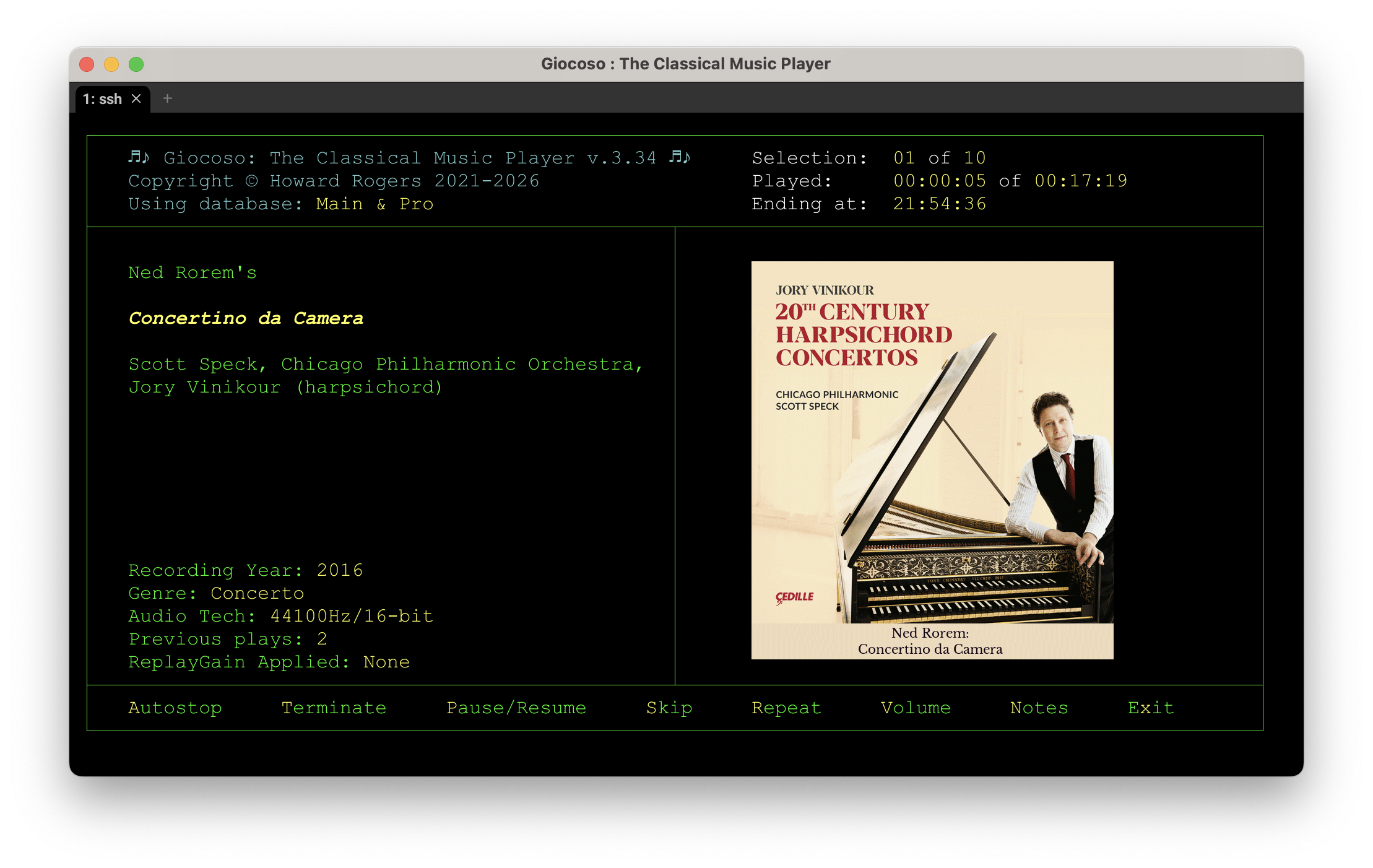
The 'ReplayGain Applied = none' data shown in the lower left-hand corner of the program display is what happens when the canonical ReplayGain tags are not present as tags within the FLACs being played, even though the configuration option says that ReplayGain ought to be in use. It's also what you'll get if the tags are present but they're set to null values, by the way.
When the tags are present, with non-empty values and the Giocoso parameter is set to use ReplayGain, you'll instead see something like this:
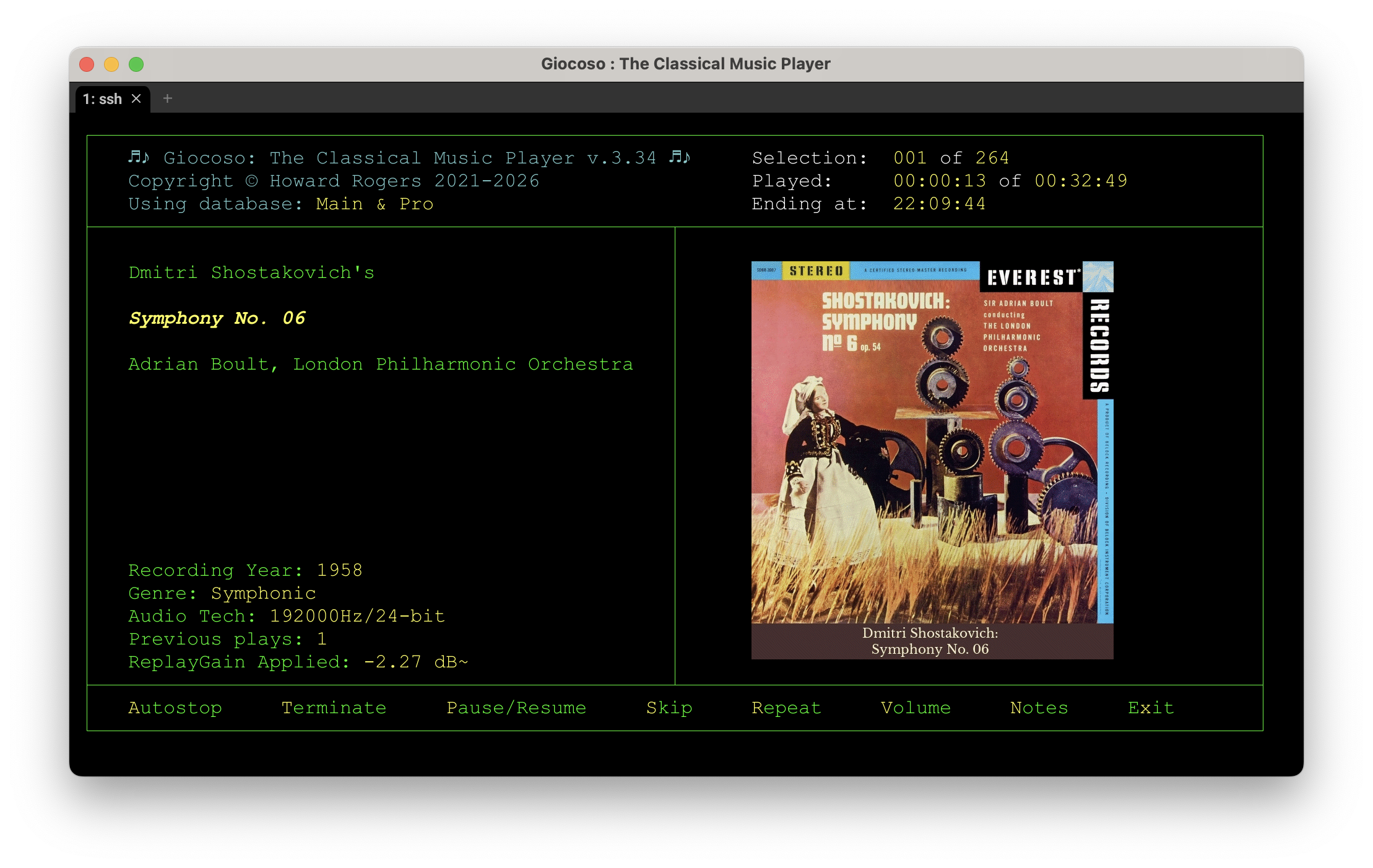
This time, you'll see that a numeric ReplayGain has been applied, dynamically and in real-time, to the music being played back. You'll notice that in this specific case, a negative ReplayGain has been applied: the playback is being made at around 2.27dB quieter than the audio signal in the FLACs is actually stored at. That's perfectly valid and isn't a sign of anything wrong. If you're interested, it happens for me quite a bit because I used Semplice's other volume boosting technique of maximising to peak values: a lot of my recordings are thus physically rather loud in absolute terms (still without distortion, I hasten to add). ReplayGain being applied to such physically-boosted FLACs tends to find them too loud and adjusts downwards accordingly. Were I to rip a 1980s classical music CD today, without applying a Semplice physical (peak-driven) boost, it's almost certain that the displayed ReplayGain value would be a positive one.
Another little detail you'll see in that last screenshot, too: the volume change is shown as -2.27 dB~. That little squiggle after the numeric value tells you that clipping avoidance has been activated: that's Giocoso's way of saying that in achieving a 'reference' perceived loudness, it's taken care to ensure that transient loud spikes in volume won't trigger clipping: it has applied a 'safety margin' to the boost to prevent it.
If it ever happens that Giocoso can apply an album-level boost without needing to apply clipping protection, that last character will be a simple . and not a ~. That is, a period/fullstop indicates no clipping protection was needed, but a cedilla indicates that it was.
3.0 Retro-fitting ReplayGain
I've come pretty late to ReplayGain but have found that when it's being used by Giocoso, the results have been pleasing. Trouble is, I've been doing peak-level volume boosts for years and therefore none of my approximately 17,000 recordings have had ReplayGain computed for them: what I need, therefore, is a way of batch-updating my music files to add ReplayGain in a hurry.
Here's the script I used to do that:
clear
sqlite3 "$HOME/.local/share/giocoso3/db/test.db" "select dirname from recordings order by composer" > "directories.txt"
tput civis

# File containing the list of directories
DIRFILE="directories.txt"

# Initialize counters
GAINCOUNTER=0
SKIPCOUNTER=0

# Loop through each line of the file
while IFS= read -r dirname || [[ -n "$dirname" ]]; do

  # Change into the directory
  cd "$dirname" || { echo "Failed to cd into $dirname"; continue; }

  FLACFILE=$(find "$(pwd)" -name "*.flac" | sort | head -n 1)
  DISPLAYFLAC="${FLACFILE#/*/*/*/*/}"; DISPLAYFLACFILE="$(basename "$DISPLAYFLAC")"; DISPLAYFLACFILE=${DISPLAYFLACFILE:0:98}
  DISPLAYPATH="$(dirname "$DISPLAYFLAC")"; DISPLAYPATH=${DISPLAYPATH:0:98}
  GAIN=$(metaflac --show-tag=REPLAYGAIN_ALBUM_GAIN "$FLACFILE" 2>/dev/null | cut -d= -f2)
  tput cup 2 54; echo -n "ReplayGain Computed: $GAINCOUNTER - Skipped: $SKIPCOUNTER"
  if [[ -z "$GAIN" ]]; then
      tput cup 6 2; printf '%*s' 98 ''; tput cup 6 2; echo -n "$DISPLAYPATH"
      tput cup 7 2; printf '%*s' 98 ''; tput cup 7 2; echo -n "$DISPLAYFLACFILE"
      echo "$FLACFILE" >> "$HOME/Desktop/adjusted.txt"
      metaflac --add-replay-gain *.flac 2>/dev/null
      ((GAINCOUNTER++))
  else
      tput cup 6 2; printf '%*s' 98 ''; tput cup 6 2; echo -n "$DISPLAYPATH"
      tput cup 7 2; printf '%*s' 98 ''; tput cup 7 2; echo -n "$DISPLAYFLACFILE"
      ((SKIPCOUNTER++))
  fi
done < "$DIRFILE"
tput civvis
The code depends on Giocoso having been installed and a local, non-Pro database of all your music files being in existence. The line reading “sqlite3…” is the code needed to open that database for reading: obviously, you'd need to replace the “test.db” with whatever database name you're actually using.
Otherwise, the code simply queries the local database and extracts a list of folders containing FLACs from it, into a text file called “directories.txt”, stored in whatever folder you're in when you launch this script.
It then loops through each line of that text file. It cd's to each folder in turn. It checks to see if ReplayGain has been previously computed or not: if it has, it simply skips doing anything further and merely increments a 'skipped' counter. If it hasn't, though, it analyses all the FLACs in that folder and writes the newly-computed REPLAYGAIN_* tags back to the FLACs and increments a 'Gain Applied' counter. It also writes the name of the FLACs for which it has modified the metadata into an 'adjusted.txt' on your Desktop.
You save that code into a file called, say, “applyreplaygain.sh” on your Desktop. In a terminal, you then type:
cd
cd Desktop
chmod +x applyreplaygain.sh
./applyreplaygain.sh
…and then leave the thing to chug away for however long it takes to process your collection. It's output is not pretty and isn't meant to be: this is not something you'll be running routinely!
You can run the script multiple times though: if you let it complete the first time, then the second time you run it, there should be nothing to do and you'll get all skips and no gains applied. That isn't actually what happened to me, though: I had three files that kept coming up time and time again as needing gain applied. The fact that gain failed to be written back to the files the first time of asking indicated that something was internally amiss with those files (knowing which files had this problem is when the “adjusted.txt” file becomes handy). A re-rip of the three CDs in question then fixed the problem.
I don't generally approve of bulk updating of anything to do with my music collection: the risks of something going horribly wrong are too awful to contemplate. I made an exception for this only because the script is simply adding the five ReplayGain tags to the files and not messing with any other metadata or with the audio signal: it's thus (a) safe; and (b) reversible. I still made sure my backup was fully updated before I began, though: and I strongly recommend you do likewise!
4.0 Final Thoughts on ReplayGain
There are differing views on the utility and effectiveness of ReplayGain. Some people love it, as it allows you to achieve a sort-of 'average, overall loudness' in a listening session, without having to fiddle with volume controls all the time. Some people find it ineffective. And some people hate it, preferring the peak-driven loudness boost approach instead, because that just makes everything louder without fancy psychoacoustic modelling mucking things up!
That's why the use of ReplayGain in Giocoso is optional: even if the ReplayGain tags are there and assigned real values, Giocoso's default behaviour is to ignore them and to just play the audio signal as it comes straight out of the FLAC files. The configuration option is there to make it easy to switch on the use of ReplayGain if you want to give it a go, though (provided you've previously done the analysis and tag-writing in other software first, of course).
I should mention, however, that once switched on, ReplayGain stays on until you switch it off in the configuration options: you cannot flick it on and off as a piece of music plays, for example, to compare the 'before' and 'after' volumes. The way Giocoso is written, that sort of on/off mechanism is simply not physically possible.
To my mind, it's very clever and has the great advantage of not messing with the actual audio signal you ripped off a CD or SACD. The adjustment to playback volume is handled by the player, dynamically, not by altering the audio data directly or physically. It's therefore reversible (i.e., just switch it on or off in the configuration options as the mood takes you), where physically boosting the volume of a FLAC by measuring its peak loudness and getting the peak as close to 0dB as you can is an irreversible alteration of the audio signal itself. If you care about reversibility and pristine data preservation, ReplayGain has a lot to offer, I think.