Niente Version 4.04 Released (On Time!!)
 Completely on schedule, despite a migration of my website to a Proxmox-hosted LXC container and a whole new iMac purchased at the end of January (I trust I am impressing you!), I have today just released a new version of the Niente FLAC-checking program. It is the first new version since 10th April 2025, brings the version number up to 4.04 and is a fairly significant release for a number of reasons.
Principle amongst these is the significant amount of code re-writing needed to make Niente a full first-class citizen on macOS, AlmaLinux 9 and AlmaLinux 10. This website's own page of Niente statistics has been produced by macOS since about the 10th February; between December 2025 and the end of January 2026, they were coming out of AlmaLinux 9; and between February 1st and February 9th, they were the product of AlmaLinux 10. All three new operating systems have been tested pretty comprehensively, therefore.
The other huge new feature is a complete overhaul of Niente's reporting mechanism. Niente is, fundamentally, a metadata collector and a report generator, so to have half its core functionality pretty much re-written from the ground up is fairly significant! All Niente reports have had their logic tweaked and refined… and every one now outputs to your system's default web browser. A new configuration option allows you to specify a specific browser if you prefer, but if you leave it blank (which it is by default) whatever your default browser is will be used to display all reports.
One final key new feature I should mention, too, is that Niente is now ReplayGain aware: its database table acquires a new column to store any ReplayGain_Album_Gain metadata tag values detected within a FLAC: if there is none, that results in a new item on the Aggregate Statistics report, counting the number of FLACs that don't have ReplayGain data. You might have no interest in ReplayGain, of course, in which case you can ignore the statistic: it's listed as an “other” statistic and therefore not actually indicative of a physical or logical metadata problem.
Full details, as ever, are in the Niente changelog.
Upgrading is a bit of an issue, this time round. The last version of Niente was released back in the day when the source of software updates was absolutelybaching.com. It is therefore unfortunately the case that attempting to use the usual Administration menu, Option 5 to update will not work, as the program will be attempting to obtain fresh software from the wrong source. To obtain the latest Version 4.04 software, therefore, the upgrade procedure is simply:
wget software.bbritten.com/neninst
bash neninst
…and follow the prompts. It's basically a fresh installation from scratch and is likely to mean that you'll need to perform a full database re-load (Database menu, Option 2) followed by a full integrity check (Integrity Checks menu, Option 1). Apologies for this break in the usual upgrade process: the change of website between absolutelybaching and bbritten.com is the sort of one-off upheaval that has unintended consequences! It shouldn't happen again.
Normal Service will resume in 3...2...1...

 My apologies for the fact that this site was down for most of yesterday. I was in the middle of a long-planned move of the site from a virtual machine to an LXC container, for efficiency reasons, when real life intervened and I had to leave the migration in mid-move. I believe everything has been brought across now and normal service should have resumed, but see the picture at the right….
Let me know if you spot any outstanding issues.
Giocoso Version 3.35 Released (Early again!!)
 I have just released Giocoso Version 3.35, a few days earlier than planned. It is a decently-significant release, in that it contains more bug fixes for running on macOS and a completely new reporting infrastructure: instead of attempting to display data within the confines of a size-restricted terminal, all Giocoso reports now open in a browser. By default, your system's default browser will be used, but a new configuration parameter allows you to specify any already-installed web browser instead:
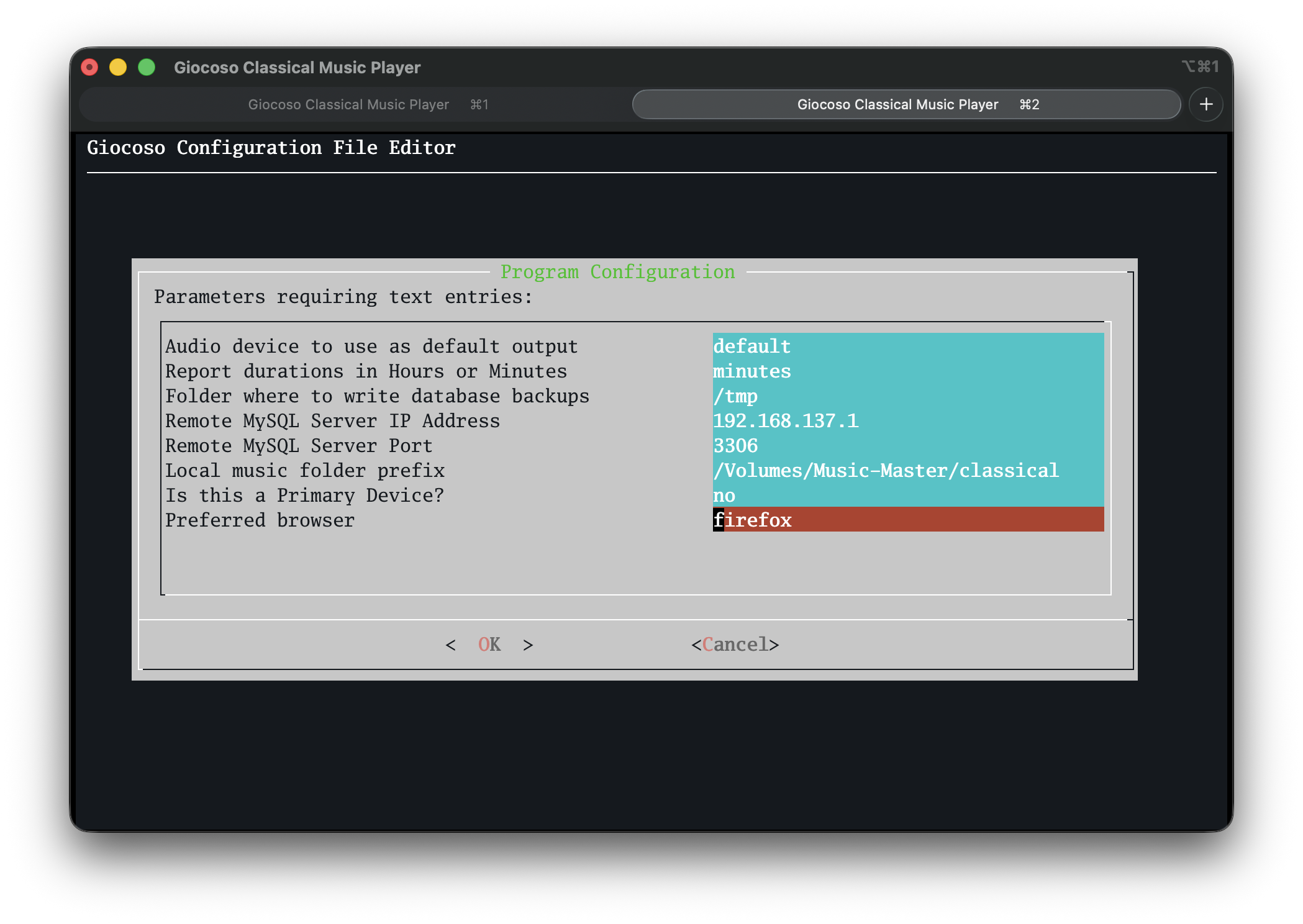
In addition, a new report and selection filter allows you to see who your 'rarely-performed' composers are: that is, composers who haven't had anything played within the past 120 days. The selection filter is configurable (so you could declare 'not played within 82 days' to be 'rarely-performed') but the report is not.
Anyway: full details as ever are over in the changelog. Upgrading is the usual business of using the Administration menu, Option 2 and following the prompts. For assorted reasons that needn't detain us, you may be told at the end of the upgrade process that 'something went wrong': ignore that, quit Giocoso (ignoring any error messages that might appear on the way out) and then re-launch the program. A second attempt at an upgrade should give you a message along the lines of 'you're all good: nothing needs updating', at which point you're good to use the program as normal.
Giocoso Version 3.34 Released (Early!!)
 I've just released a new version of Giocoso, Version 3.34: that's about 20 days earlier than planned, as a result of testing and dog-fooding having gone so well.
The big new feature is, I think, support for ReplayGain: if you enable the feature using the Administration menu, Option 2 you'll see the following new option:
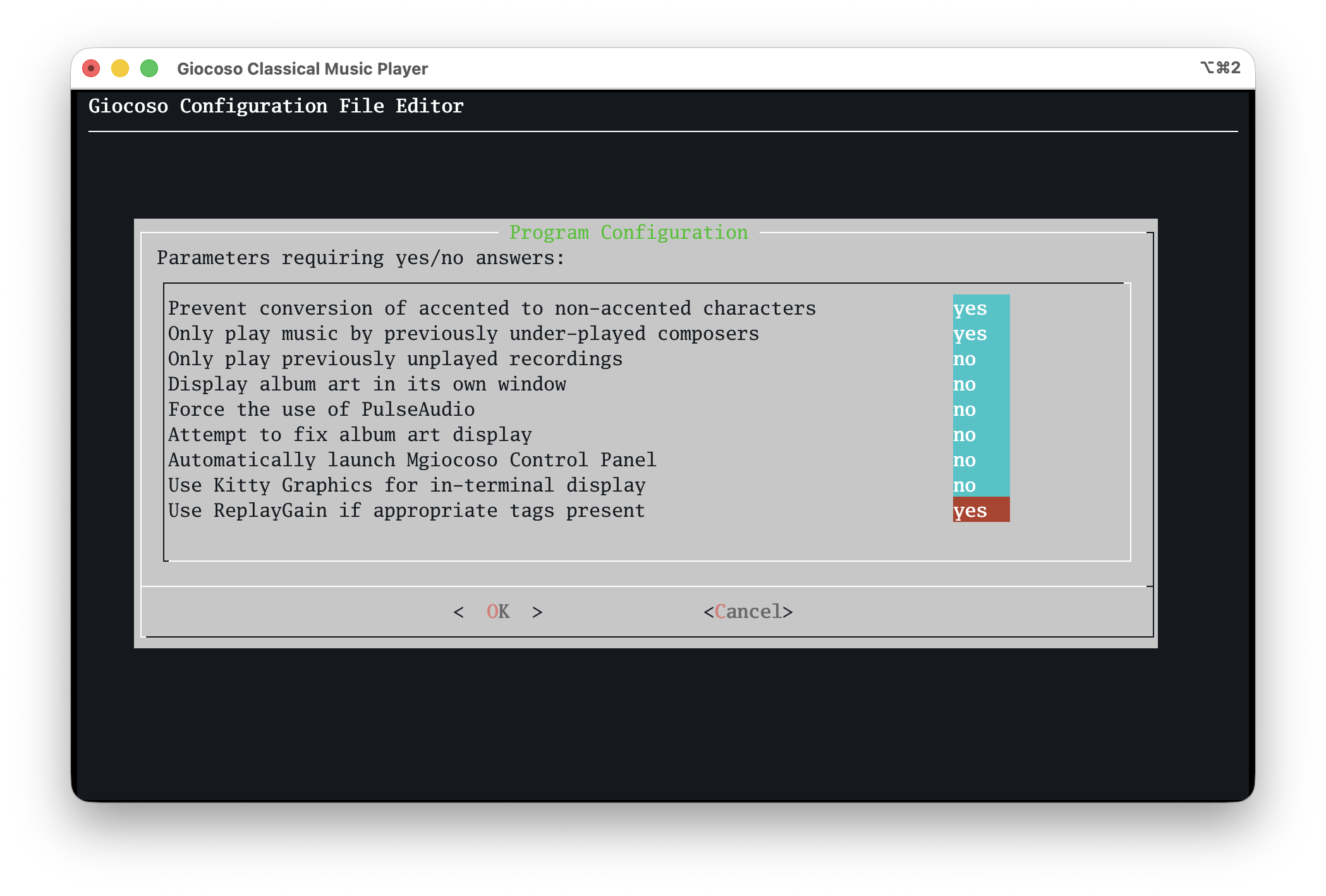
It is set to 'no' by default, but if you set it to 'yes' and then play some music for which ReplayGain metadata tags have been computed and written, Giocoso will apply the necessary volume boost in real time, dynamically. It's a feature that music players like Foobar2000 have had for years: it was about time Giocoso caught up!
The program interface has had a bit of a makeover, too:
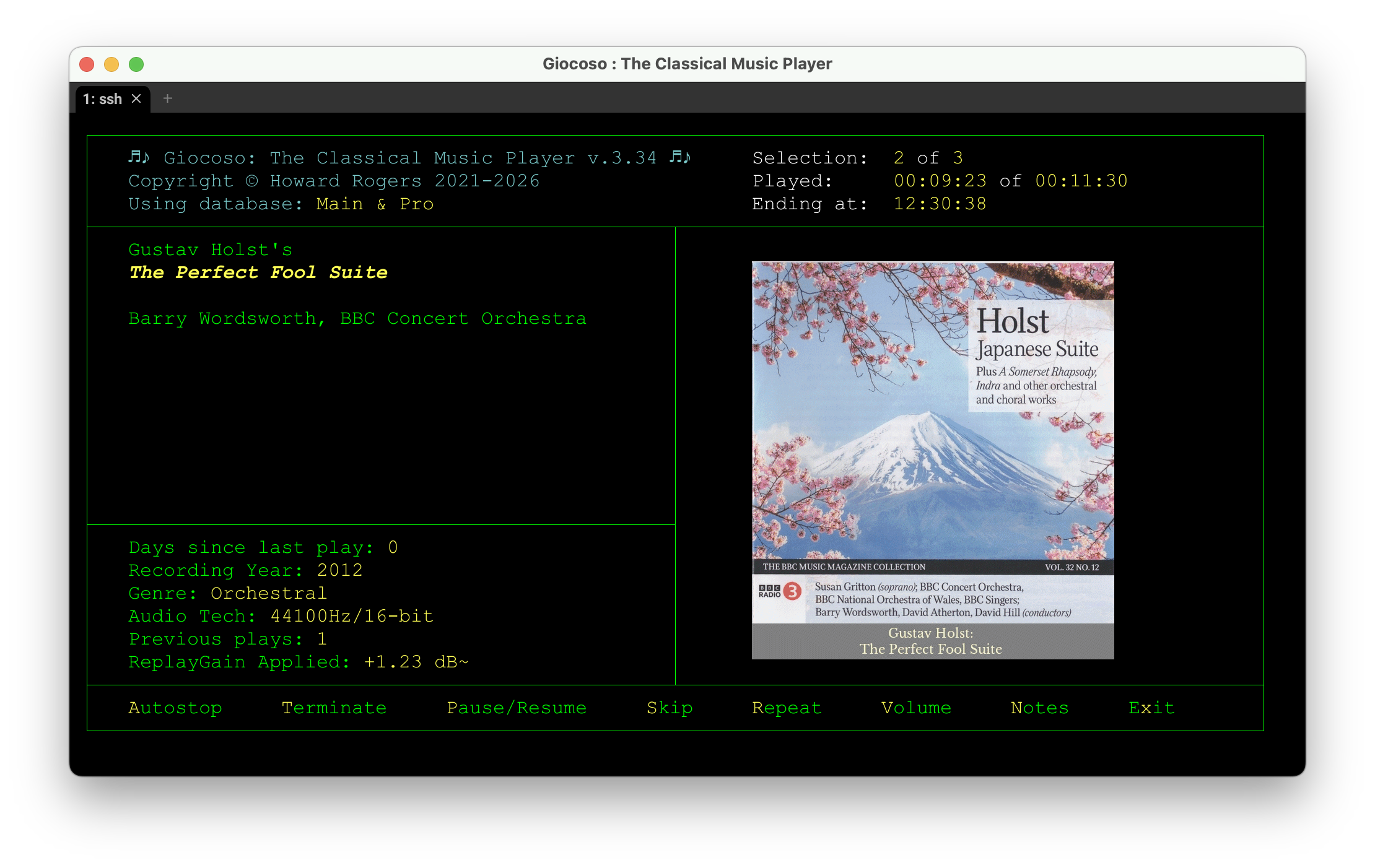
You'll note the ReplayGain information is now displayed (it says 'None' if you haven't switched on the new feature, or if your music files don't contain ReplayGain information tags) and that techy details have been 'ruled off' from the composer-composition-performer details. A minor 'touch up' to the look and feel, but I think it looks a bit tidier.
There are several other key new features, some of them quite important: read the Changelog for details, as usual.
Buried amongst references to bug fixes and enhancements is the over-riding truth that quite a lot of work has gone into refining the running of Giocoso on macOS, especially new, Apple Silicon macOS using Homebrew. Previously, much of my Apple work was done on older, Intel-based Macs that installed software dependencies via MacPorts. The two package managers work rather differently and pull down rather different software for the same package name, unfortunately! Anyway: that's going to be an on-going process, now that I've switched to macOS full-time, but things already work smoothly for me now.
Upgrading to the new release is accomplished in the usual way: take the Administration menu, Option 1 and follow the prompt to supply your sudo password. Once the update has completed, quit Giocoso completely (ignoring any error messages you might see on the way out) and then re-launch the program from scratch.
Have fun!
Semplice Version 2.12 Released
 I have today released the next version of Semplice, Version 2.12. The details are, as ever, in the Changelog but there are two big changes that deserve special mention.
First and most significantly: Semplice now installs on and is fully supported in Tier 1 fashion on macOS. It's been tested on everything from a 2012 Mac Mini running Catalina to a 2026 M4 iMac running Sequoia and Tahoe, so whether you're using Intel CPUs or Apple Silicon, it should all work as intended. There are two known issues regarding ripping CDs. First, macOS cannot detect a CD/DVD drive unless there's a disk inserted into it. Semplice on macOS cannot therefore 'poll' the CD drive to see when a disk is inserted because that drive doesn't even exist until after the disk is inserted! It's a minor issue, really, and simply means that you insert your CD before invoking Semplice's ripping options.
The second issue is a little more awkward: if your CD/DVD drive happens to be an Apple SuperDrive, Semplice cannot automatically determine the correct read offset to use when ripping to ensure accurate rips. That's down to Apple: multiple manufacturers made the internals of the SuperDrive, each with their own read offsets… but Apple deliberately obscures that manufacturer information when interrogating the drive. Accordingly, it's physically impossible to know what the correct offset to use for any particular SuperDrive should be. I worked around this for my own SuperDrive by plugging it into a Linux machine and getting Linux to reveal that it was made by LG: knowing that, I was able to check the AccurateRip database of known offsets manually and thus determine my offset should be '+6'. An alternative workaround would have been to use a non-SuperDrive device: Apple doesn't obscure the hardware identifiers for such third-party drives and thus Semplice can still accurately determine the correct read offset for them.
Anyway: I use Semplice everyday on my iMac to rip new CDs and tag-up previously ripped-but-not-yet-catalogued ones. It works perfectly well.
The second big new feature is support for ReplayGain. Semplice has always previously performed volume boosts by physically altering the data in the audio signal part of a FLAC. That sort of physical volume boost is based on peak loudness: find the loudest part of a FLAC (or a folder of FLACs) and find out how far away that peak loudness is from 'ideal, perfect, non-distorting maximum possible volume'. Then boost the volume of all FLACs in a folder by that amount: everything gets boosted by the same amount and everything ends up as loud as it possibly can be. All of that functionality remains untouched in the new version of Semplice: it is also still the default volume boosting mechanism. The trouble with it is that it alters the digital data contained inside a FLAC in an irreversible manner… and rather a lot of audiophiles don't like doing that sort of thing! It also requires, at least temporarily, at least twice the disk space and a lot of CPU, because the original FLACs need to be transcoded into new, volume-boosted files before the originals can be deleted. To deal with those sorts of issues, therefore, Semplice Version 2.12 now can be asked to do a 'metadata-only' volume boost. The FLACs are analysed as before… but instead of then altering the volume of the digital audio signal, a set of five metadata tags are written to the non-audio part of the FLACs. These tags contain data about the peak loudness of the FLACs and the amount by which they can be safely boosted. It's then up to your music player to read these tags and to apply that pre-computed volume boost in real time, during playback. Remove those tags and the playback will be back at the original, non-boosted volume: this sort of volume boost is thus completely reversible, is quick to compute (because no transcoding is required) and doesn't consume lots of CPU or disk space (because no transcoding is required!). This 'metadata volume boost' is actually something of an industry standard way of doing things and is called “ReplayGain”. Semplice, therefore, now supports computing ReplayGain and writing the tags necessary for players to apply it.
Whether your player can apply ReplayGain is a matter for you to sort out: Foobar2000 can apply it, but it needs to be told to do so. Other players behave similarly. My own Giocoso is being re-written to be able to do it when appropriately configured and should be released fairly soon.
There are all sorts of other, more minor, enhancements and bug fixes, of course. As I say, read the changelog for those details.
Updating to the latest version should be just a matter of taking the usual Miscellaneous menu, Option 3 and following the prompts. For obscure reasons, that may however end in a message that 'something went wrong with the downloads, try again later'. If that happens to you, then just quit Semplice completely and issue the following commands in a terminal session:
cd
rm -f seminst
wget software.bbritten.com/seminst
bash seminst
…and then follow the prompts. This is in fact a complete re-install of Semplice, which will always proceed without a problem.
Incidentally, the new version release is a couple of days later than anticipated, for which my apologies… but getting the software to run on a whole new platform, especially with the purchase of a new PC in the middle of that, using a completely new CPU architecture compared to anything else I've ever used, meant rather more testing was required than I'd anticipated. As I say, I'm sorry about that… but we got there in the end with only a couple of days of delay!