Reporting
1.0 Introduction
When you perform an integrity check of your FLAC collection with Niente, not a lot appears to happen! Sure, we see the program visiting each FLAC it knows about in turn and learning things about it:
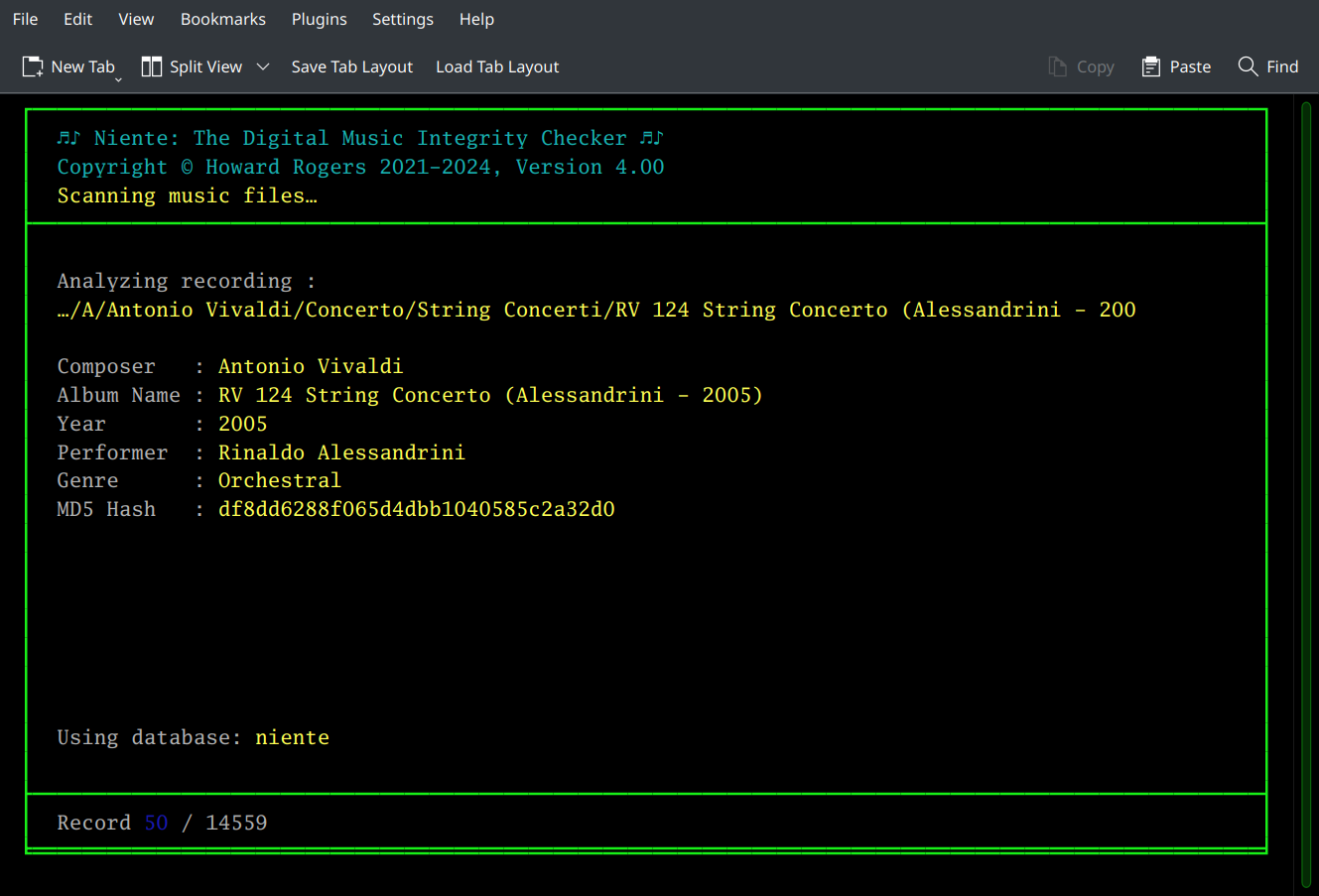
…but if it detects anything amiss during its file inspections, no red lights or sirens go off: the program will merely conclude its integrity check by re-displaying the main menu, which seems somewhat anti-climactic! So, performing an integrity check is an information gathering exercise, but the integrity check itself never shares that information with you. In order to actually see whether or not your music collection is suffering from physical corruption or logical inconsistencies, you need to use Niente's various reporting options. These all interrogate the data collected during an integrity check and list those records found to be failing one check or another.
In short: it's by running reports that you at last get to understand the health and status of your music collection.
All Niente's reports are accessible under the Reporting Menu:
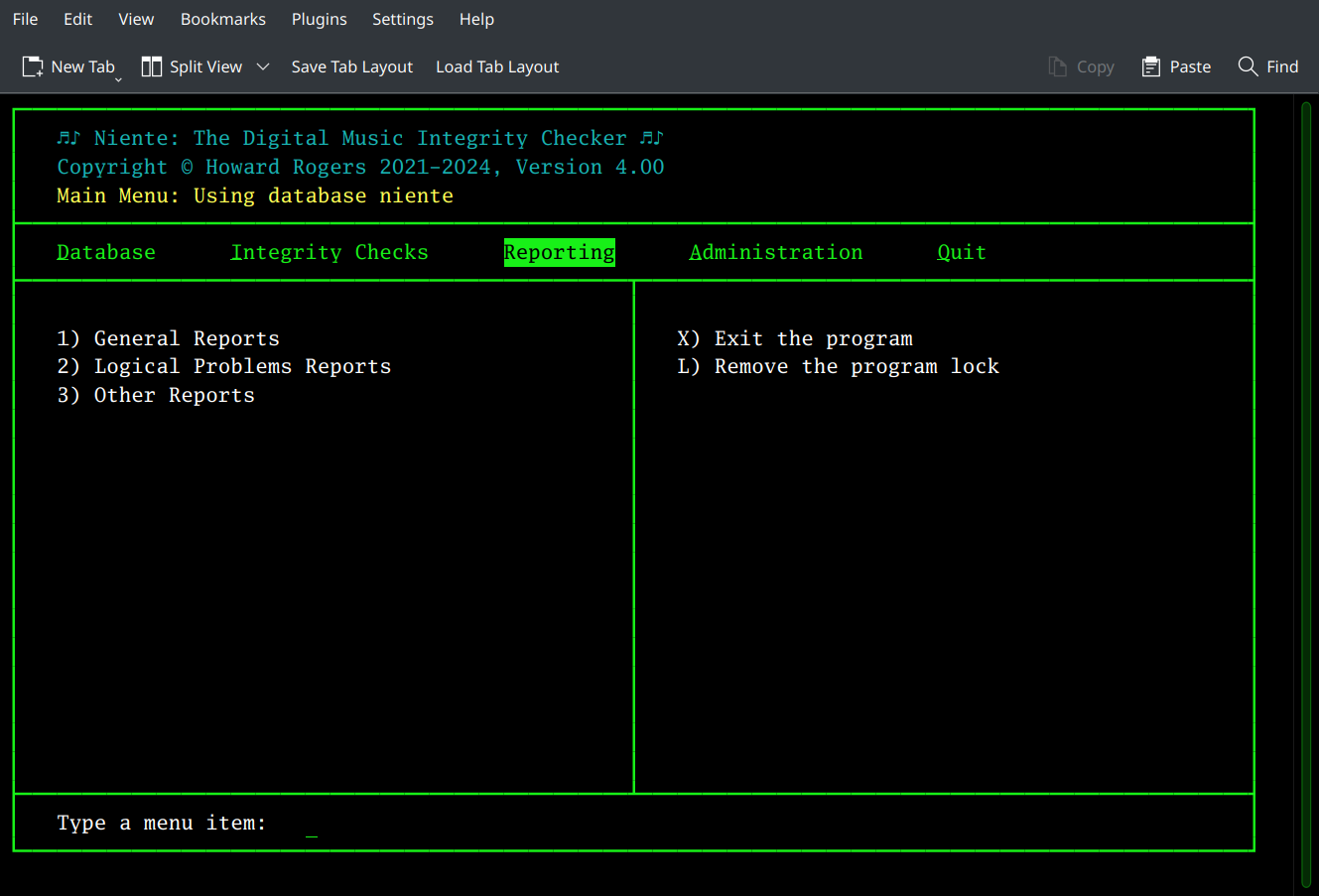
You'll notice that there are three sub-menu options listed: General reports, Logical Problems reports …and a final category unimaginitively called 'Other Reports'! You access any of these sub-menus by tapping the number next to the appropriate menu option: if you wanted to run a particular report on any logical inconsistencies in your music collection's metadata tags, you'd start by tapping '2', therefore. If you do that, you'll see this sort of thing:
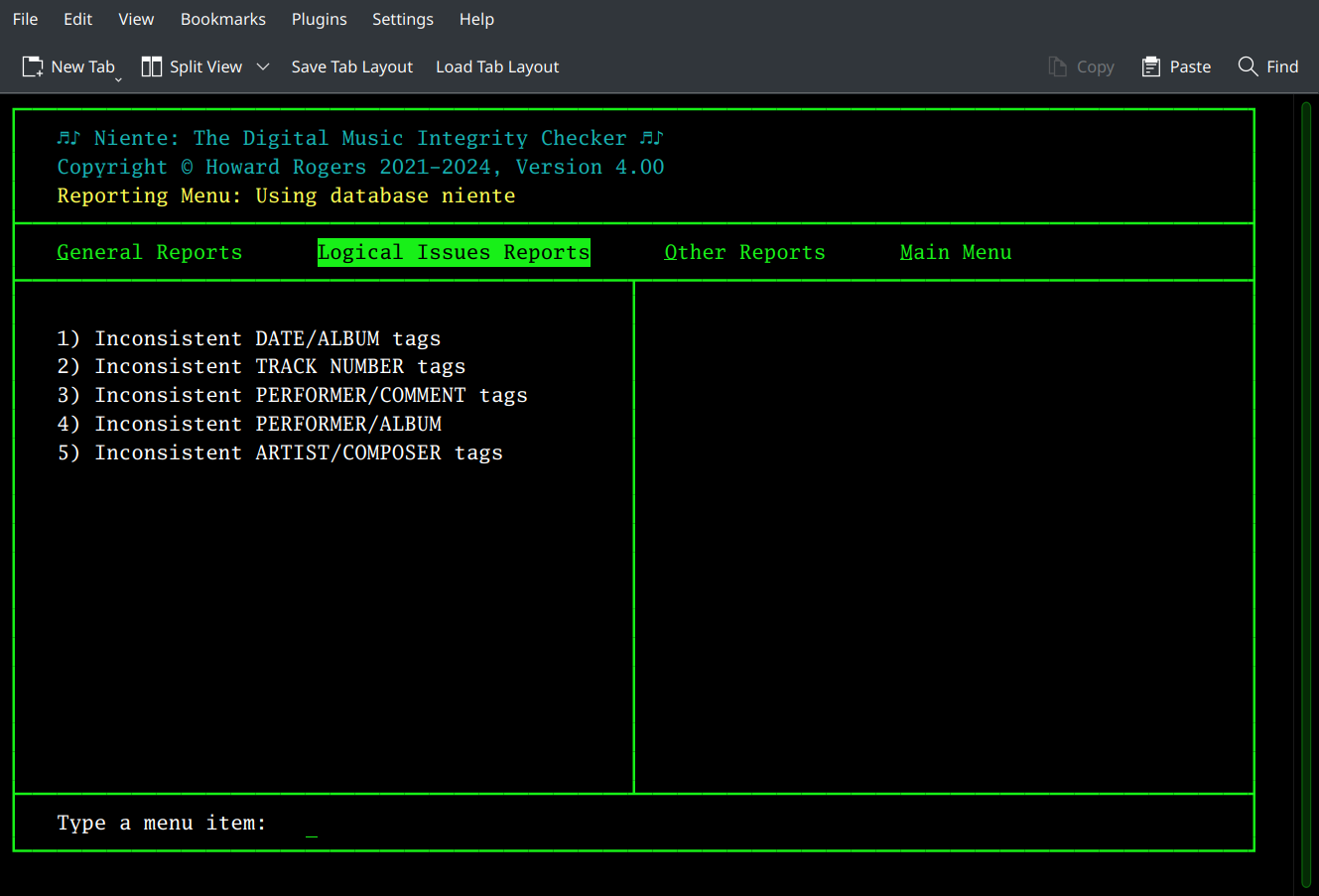
The various reports that can be generated within this category are listed in the left-hand part of the screen; the three categories of reports that were previously accessed by tapping a number are now 'promoted' to appear as options on the top-bar menu. You can therefore switch between report categories easily just by pressing the left- and right-arrow cursor keys (or by tapping the initial letter of the menu required: so typing 'g' will take you to the General Reports category, for example). When you're done producing reports, just arrow over to the Main Menu item (or tap 'm') and choose from the options presented:
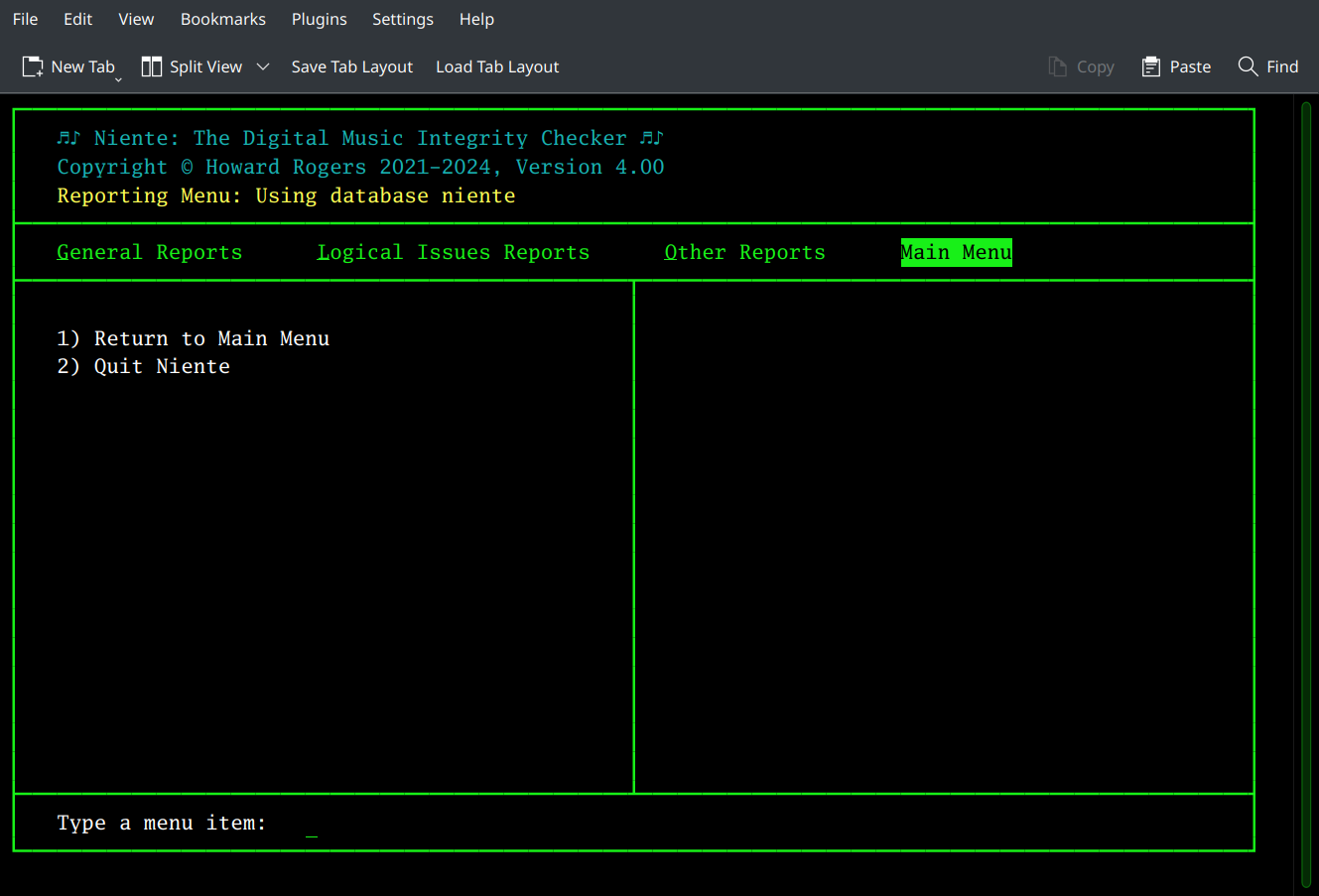
Option 1 takes you back to Niente's initial main menu (where you'll find the 'Reporting' option remains selected), but Option 2 is provided so that you can quit out of Niente completely with a single key-press.
When you choose to run any of Niente's reports, they will be displayed in your system's default browser window as an HTML document:
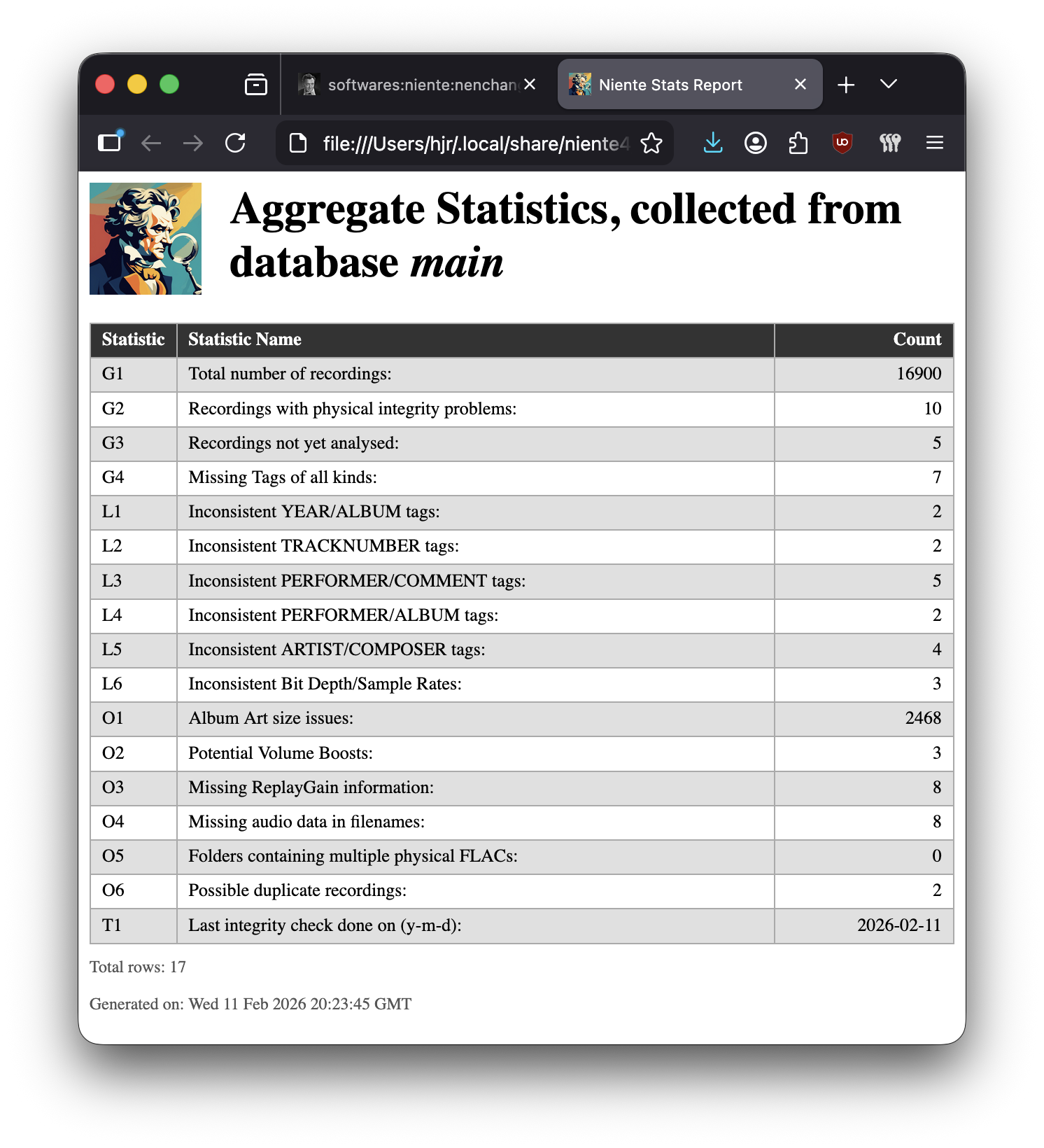
Since each report is displayed in your browser, you can use standard browser menu options to save it as a PDF or as a text file. In Firefox, for example, just click the File → Print menu options and then select the 'Save to PDF' option from the standard print dialog. Similarly, File → Save Page As will let you save the report either as an HTML or a plain text document.
Bear in mind that every report is produced by reading from the Niente database as it was at the time of its last integrity check. If, let's say, you produce a report that tells you four files have PERFORMER/ALBUM tag inconsistencies and you re-tag all four of those files before re-running the report once more… you're just going to see the same four files listed on the new report as they were before. The database doesn't know you've re-tagged those files until you make it realise the fact by performing a new integrity check (I'd suggest a fast check in these particular circumstances). Only after a new integrity check is performed will you see the report contents change. Similarly, if Niente tells you 3 files are physically corrupt and you restore those files from a known good backup, so that the files on disk are no longer physically corrupt, Niente will still tell you they are corrupt, because unless you do a new integrity check (in this case, a differential one would be most appropriate), its database still stores details of the original files. The new integrity check will force Niente to re-read those files and when it does so it will, at that point, notice that the internal characteristics of the files have changed and write those new, uncorrupted characteristics back to its database.
Finally, before I describe the reports in some detail, remember that when it is not reporting on the physical integrity of your FLACs, it's drawing on the Axioms of Classical Tagging to determine whether something is 'wrong' about your FLACs or not. If you do not yourself subscribe to all or some of those Axioms, the relevant reports will be of no use to you -but Niente will keep reporting them as a problem anyway! If you think recording artists should be listed in the ARTIST tag, for example, and not in the COMPOSER one, then every single FLAC you own is likely to be reported as having a 'ARTIST/COMPOSER' inconsistency. You can simply ignore such reports though, if it suits you to do so.
2.0 General Reports
2.1 Quick Aggregate Statistics (Option 1)
Possibly the most useful report that Niente can produce, the Quick Aggregate Statistics report is a snapshot summary of the state of your music collection. It lists 16 specific statistics, as you can see in the last screenshot above.
Ideally, you want to see zeroes for all the rows in this report, except the first and last ones. The first row tells you how many recordings have been added to the Niente database (so hopefully that's non-zero because otherwise it means you don't have a music collection!). The last row shows the date when the last integrity check of some sort was performed and thus the date when the database was last brought up-to-date with the state of tagging and physical integrity of your collection.
Each statistic is prefixed with an identifier (such as 'L4' or 'O2'): these are the menu options you'd take to produce the report that 'explodes' that statistic out into its detailed, constituent rows. For example, the details about what 'Inconsistent PERFORMER/ALBUM tags' I have are called 'L4', which means 'Take the Logical Issues Reports menu, and run report 4 from there' (i.e., L4). The details behind the 'Recordings not yet checked' statistic, however, can be obtained by running the 'General' report number 3 (G3). Likewise, to list all the files that are missing sample rates in their file names, I'd need to run the Other report number 3, or O3.
You get the idea, I hope: each non-zero row in the Quick Aggregate Statistics report should be regarded as a trigger to produce the corresponding detailed report that will list the specifics of what's been detected as potentially going wrong.
Note that two statistics may not be listed in this Aggregate Statistics report, though they will be by default. The rows O2 (“Potential Volume Boosts”) and O4 (“Missing audio data in filenames:”) will only appear if you have configured the persistent configuration parameters Report on volume boosts and Report filenames without bitdepth data respectively. Both parameters default to 'yes', so those rows will appear by default. However, if you switch those parameters to 'no', because you simply aren't interested in doing volume boosts to your music files and/or don't care whether their physical files contain bit-depth and sample-rate information, then those rows will disappear from the aggregate report. You can always run the equivalent detailed reports, however, even if you've turned off aggregate reporting for those particular issues.
2.2 Recordings with physical integrity problems (Option 2)
This is probably a critical report -because even if you don't agree with one iota of how I believe classical music should be tagged, we can all agree that the audio stream of your FLAC files should not undergo any alteration from the moment it was created when you ripped the CD -and this report lists those FLAC files where that doesn't appear to be true:
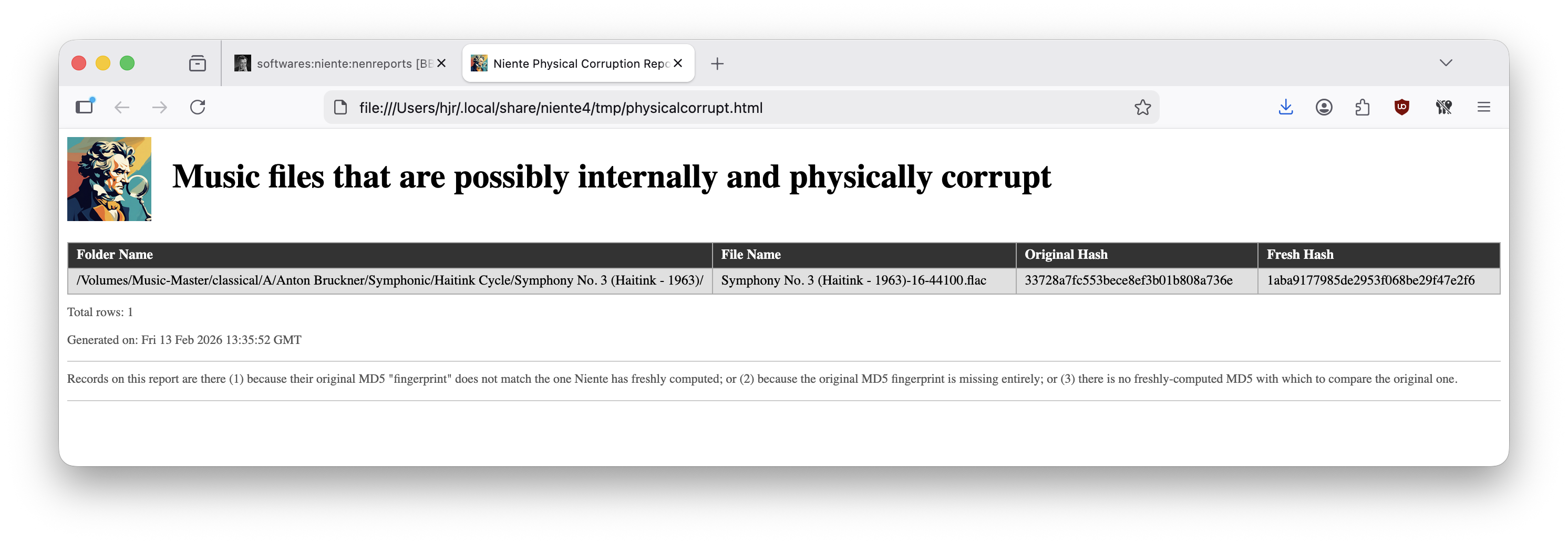
As you can see from the report itself, here Niente is comparing the MD5 hash, or 'digital fingerprint', that is stored internally within a FLAC when it is first created with a freshly-computed MD5 hash: if there's a tiny change in the bits making up the audio stream within a FLAC, the result will be that the new hash value won't match the old one… and that tiny change is probably bit-rot, meaning the file is internally corrupt.
That said, it's impossible to compare nothing to something, so if either the new or old MD5 hashes is blank, that will also trigger the inclusion of a FLAC file on this report. That might indicate corruption -or it might indicate something has gone wrong with the Niente data collection process.
There is no fixing physical corruption within the file itself. The only thing you can do for files listed on this report is to replace the file -either by backup copies which you hopefully have available to you from a time before the file was first detected as corrupt; or by re-ripping the file from the original CD (or re-downloading it from whatever digital emporium you buy your music from!) If the file is there because one or other hash values is declared 'empty', a fresh integrity check might resolve the issue.
2.3 Recordings not yet analysed at all (Option 3)
This report selects for FLACs that are missing all the tags which the first Axiom of classical music tagging states should be considered compulsory: tags such as ALBUM, COMPOSER, ARTIST, TITLE, TRACKNUMBER and so on. If all of those are missing for a particular file, it's probably because no integrity check has yet been performed on it. This is, in fact, the 'natural' state for FLACs that have just been added to your collection: an incremental addition of the files (using the Database menu, Option 3) will mean the file's physical location will have been added to Niente's database, but until a fresh integrity check has been performed, the internal tag details for such files will remain empty. That's considered something you should know about!
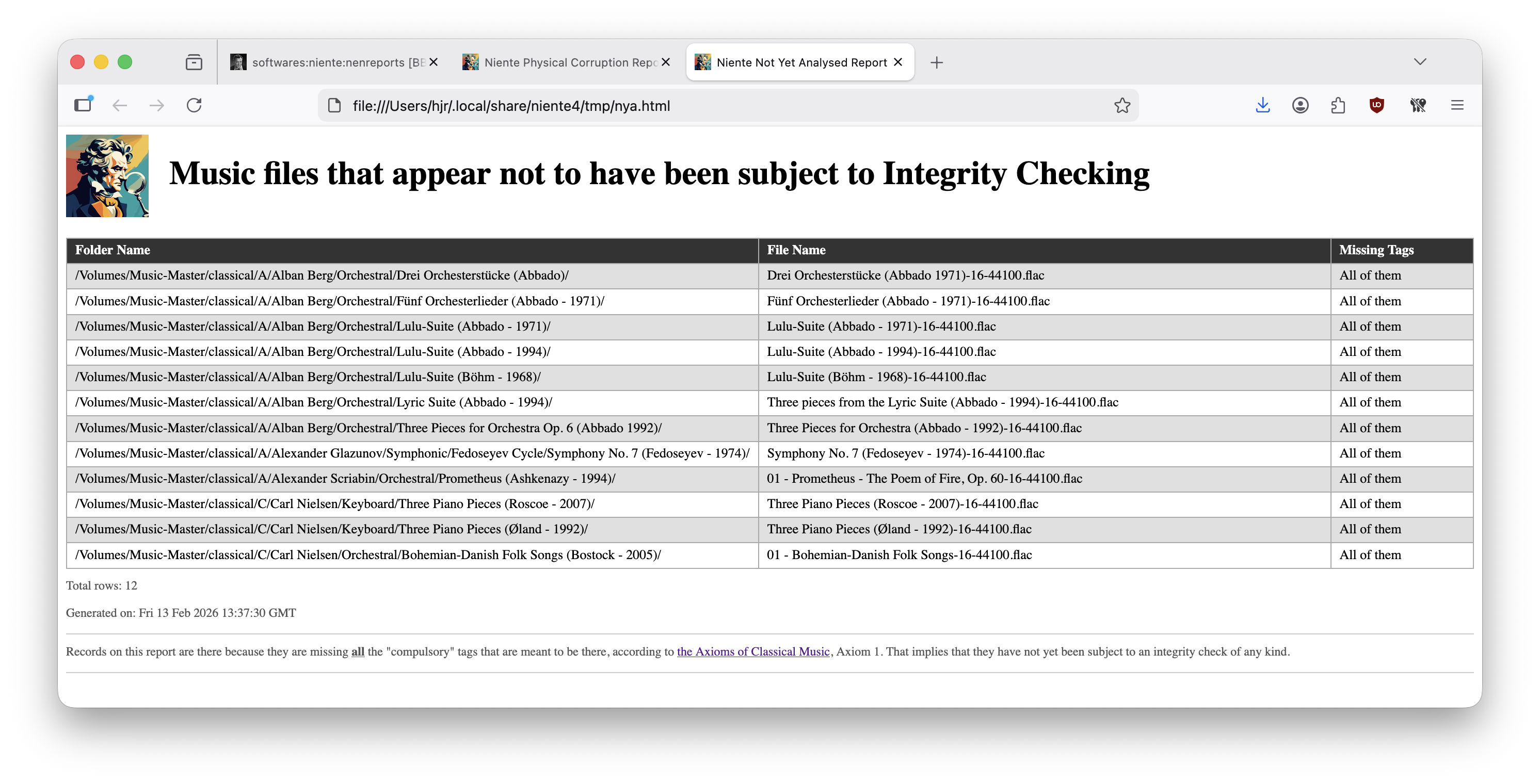
Performing a new full, incremental or fast integrity check should see these rows disappear off this report.
2.4 Files with one or more missing tags (Option 4)
The not-yet-analysed report (see Section 2.3 above) will list files that have all the 'compulsory' tags missing. That's usually fixed by running a new integrity check. This report, on the other hand, lists files that have some of those tags missing:
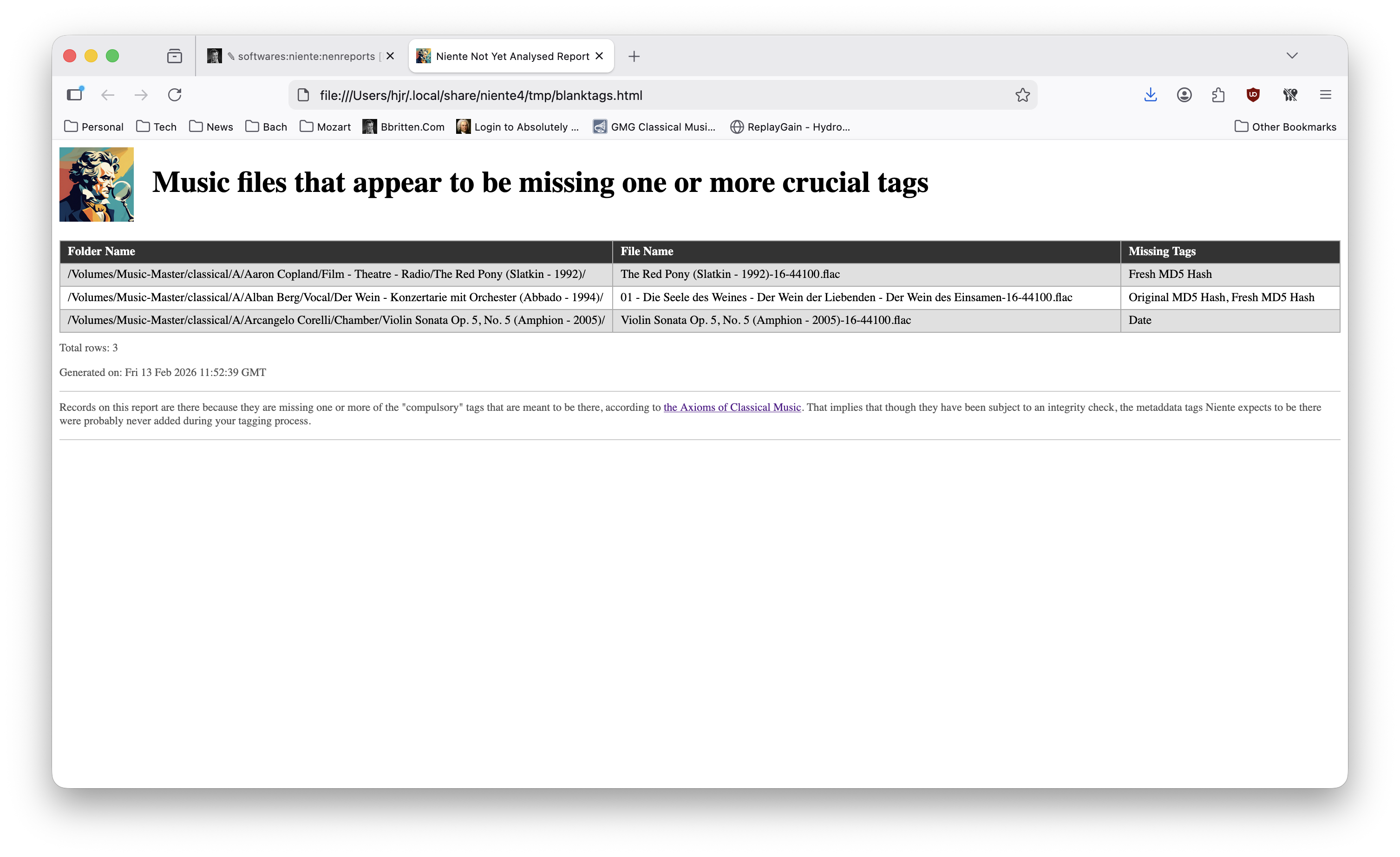
The report will actually list which specific tags are missing over on the right-hand side.
The only way some tags can be present and others missing is if the missing tags were never actually written to the FLACs in the first place. This isn't, therefore, fixable by doing a fresh integrity check: it implies that there's actually an issue with the way you tag your files in the first place. Only a fresh round of tagging can resolve this issue!
3.0 Logical Issues Reports
I won't detail the five reports in this section. They all work in ways similar to what you've already seen in Section 2.0 above so should be familiar in operation in that regard. The point to make about them all, collectively, is that they are fundamentally 'enforcing' the rules of tagging I set out in my article on the Axioms of Classical Tagging. If you agree with all or most of the axioms presented there, then all or most of these five reporrts will prove useful to you. For specifics about what Niente expects to be present in which tags and what logical consistency checks it will therefore perform, please see the Logical Inconsistencies section of this user manual.
If, however, you fundamentally disagree with my proposed tagging strategy, then you will probably want to ignore all these reports! If you don't write your ALBUM tags as 'composition (performer - year)', for example (see Axiom 5), then you won't have any need for a report that checks whether the performer component of ALBUM matches the PERFORMER tag, or whether the recording year component of ALBUM matches the YEAR (or DATE) tag.
That's not true of the General or Other reports, on the whole: even if you tag your FLACs in a wildly different way to me, reporting on tags which are missing, or which are possible duplicates of each other, or which are physically corrupt sound like good things to know about.
So, I guess my point is: the reports in the 'Logical Issues Reports' may not be to your taste, but the data is there, should you ever change your mind!
4.0 Other Reports
4.1 Recordings with album art issues
There will be no items on this report unless you have first performed a special 'check album art' integrity check (see the Integrity Checks menu, Options 4 or 5). Performing such a check adds the pixel dimensions of the embedded album art found in a FLAC file to a special 'albumart' table within the Niente database:
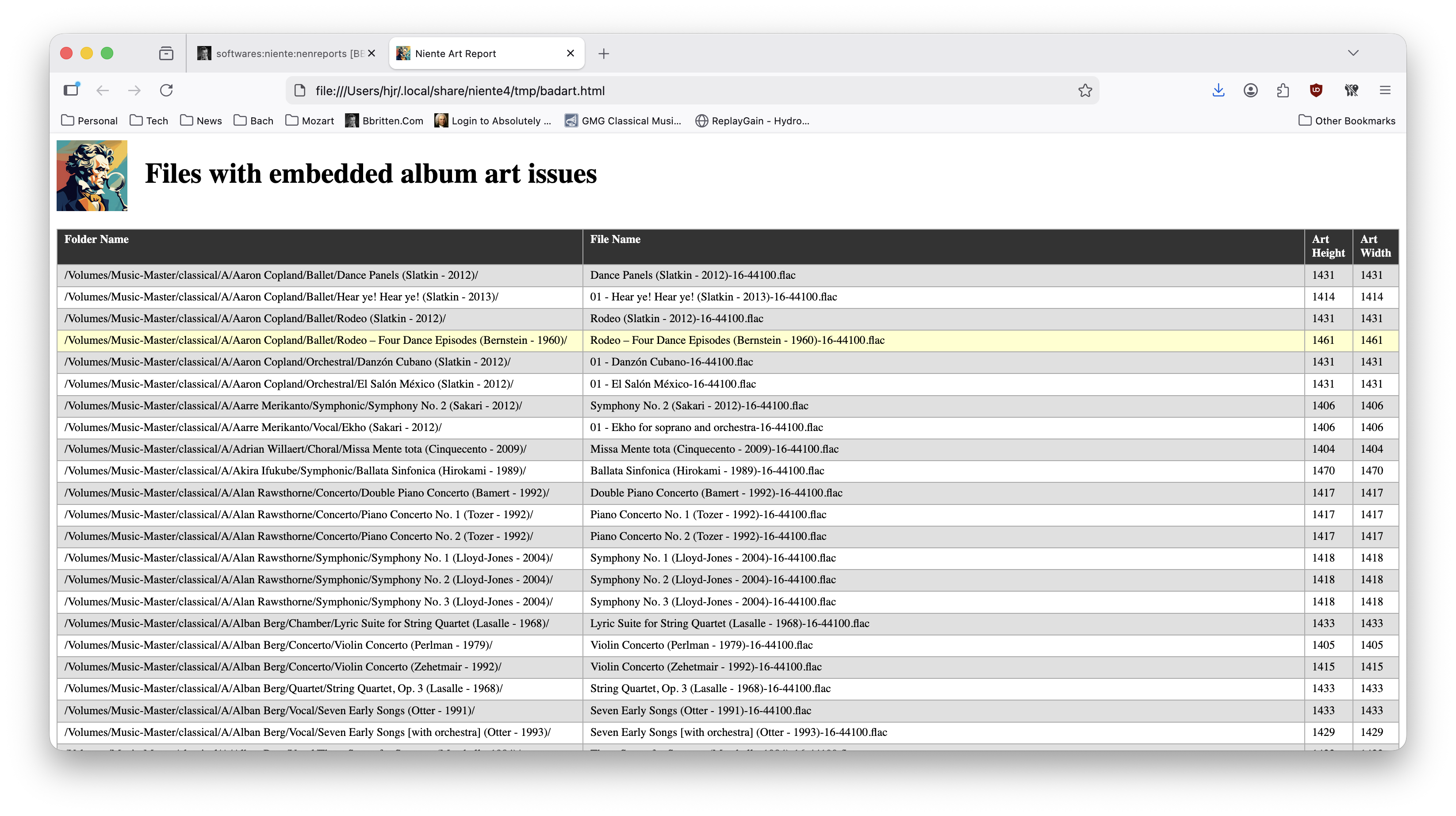
Once that table has been populated, rows will appear on this report for one or more of three configurable reasons:
- The album art height and width are not exactly equal to each other
- The height is above or below a threshold size
- The width is above or below a threshold size
By default, Niente expects album art to be square, so height and width dimensions not being identical is considered an issue. If non-square art is not actually a problem for you, you can turn off Niente's demand for square art by setting the 'Should album art be square' option in the persistent configuration file to 'no' (See Administration menu Option 1).
The configuration file also has settings for 'Threshold (pixels) for small art' and 'Threshold (pixels) for large art'. These determine if an embedded piece of album art should be considered too small or too large, respectively. From the example report shown above, it would appear that whilst all my album art is nicely square, it's considered too big: from the specific numbers shown, I would guess that my 'large art' threshold is set to 1400 pixels, so images bigger than that are considered 'too big'. Artwork which is too small will often display in a blurry, washed out manner; artwork can also be huge without actually appearing any better for it: but at either end of the spectrum, you're in charge of declaring what 'too small' and 'too large' should mean.
For anything listed on this report, the fix is to re-acquire better album art and manually apply it to the FLACs in question (using a tool such as Semplice, for example).
4.2 Recordings with possible real volume boosts
There will be no items on this report unless you have first performed a special 'check for volume boosts' integrity check (see the Integrity Checks menu, Options 6 or 7). Performing such a check makes Niente scan the contents of each FLAC listed in your database for peak loudness levels (making it quite a slow process). This is over-simplifying to some extent, but at 0dB (decibels), a FLAC is considered to be as loud as it is possible to be without clipping or distortion. A FLAC whose peak loudness is measured to be -1dB is slightly quieter than that; one whose peak loudness is -8dB is very much quieter than that.
The configuration file (see the Administration menu, Option 1) allows you to specify a 'Threshold (dB) for volume boosts' parameter. By default, it's set to '2', meaning that if a FLAC is measured to have a peak loudness of (say) -1.5dB, though it's some way off being 'maximally loud' it's not crossed the -2dB threshold for being considered a 'problem'. A FLAC measured at -3dB peak loudness would appear on this report, however, because it's quieter than that the -2dB threshold:
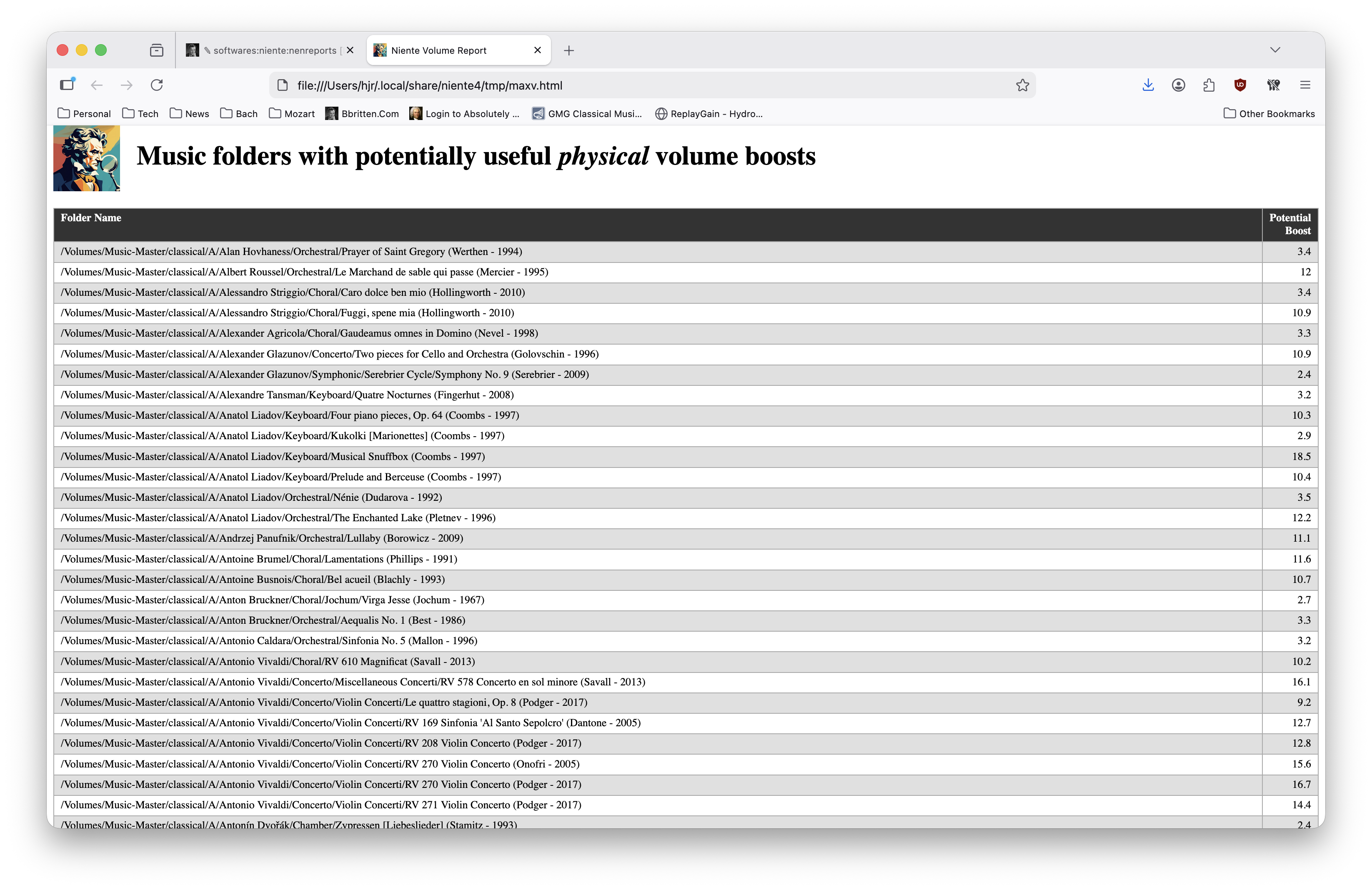
In this example report, you'll see that one of my Alessandro Striggio choral works could be volume-boosted by a whopping 10.9 decibels, were I to use a tool like Semplice to do so. This does not mean that it's a good idea to actually perform that sort of volume boost: one organ recording I have in my collection has a peak volume some 19dB lower than its maximum possible loudness, but when you apply a volume boost to it, you quickly discover why: it was recorded in a cathedral that can be heard to be full of footsteps and people walking around! The recording engineer decided to produce the CD at its very quiet level precisely to hide that 'noise floor' under the more foreground sound of the organ. Apply a volume boost to it and that noise floor becomes so prominent that it's difficult to focus on anything but the noise! So, just because recordings are listed as boostable does not mean that they actually should be boosted! Making that sort of decision is why you have a pair of ears :)
You will note, too, that this report lists folders, not files. Whilst the 'check for volume boosts' integrity check does work out the peak volume in each individual file, this report aggregates and summarises by folder. It would, after all, be pointless to tell you that file 02-Dolce.flac could be boosted by 8dB if file 01-Furioso.flac already has a peak volume that is at the theoretical, non-distorting maximum: in such a scenario, you couldn't volume-boost just file 2 without completely screwing up the relative loudness between the two tracks. You also couldn't boost both files by 8dB, because that would make file 1 sound ghastly. Therefore, confronted with two files with these loudness values, Niente will leave the entire folder off the report: nothing in that folder can be boosted without either over-boosting file 1, or changing the relative volume between files 1 and 2.
Note that Niente is not itself going to alter the volume levels in any file. It merely reports on those recordings which a tool like Semplice, for example, would be able to boost the volume of, as a completely separate exercise. It is therefore entirely safe to perform a volume boost check and to report on the results: nothing is actually modified in your music files by performing either action.
Finally, recall that the persistent configuration file has a setting for 'Report on volume boosts', which is 'yes' by default, but could be set to 'no'. That parameter controls whether a count of possible volume boosts should appear in your aggregate statistics report. It does not stop you running this report, no matter what it's set to.
4.3 Recordings with missing ReplayGain
This report will list any FLAC file which does not possess a REPLAYGAIN_ALBUM_GAIN metadata tag. That tag data is collected as part of a routine full, differential or fast integrity check:
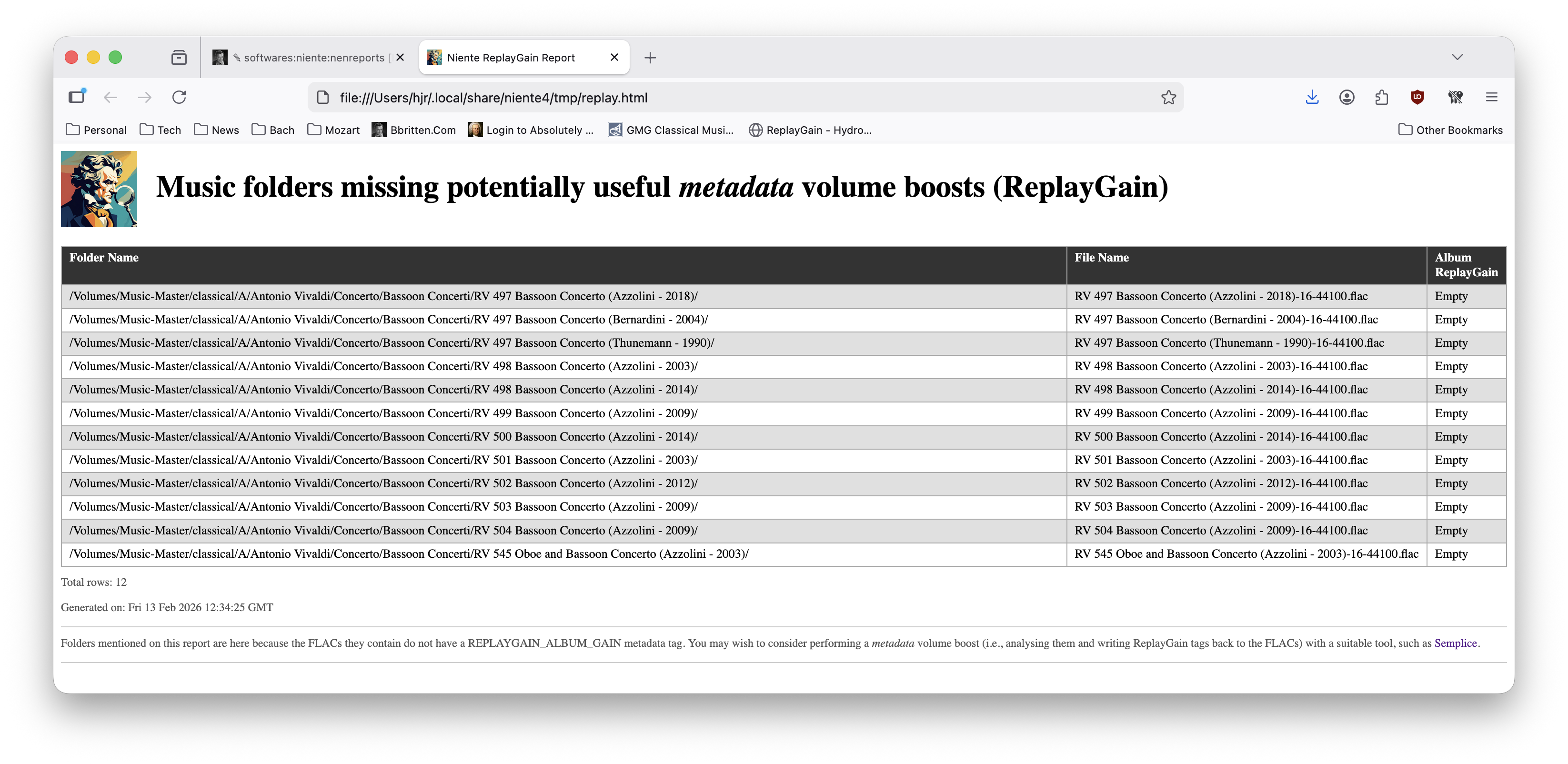
ReplayGain is an audio industry standard way of performing software volume boosts. Rather than adjusting the physical volume level of a FLAC, you can simply store a 'decibel boost' tag in the metadata for a FLAC. A suitable media player can read that tag and apply the required volume boost dynamically, in real time, without the data bits in the FLAC's audio stream ever being modified. Niente refers to this as being a 'metadata volume boost', because the degree of boost is entirely governed by the contents of the tag metadata found in a FLAC.
Niente is not computing this ReplayGain value for you: it is simply recording whether or not such a computation has been performed and written as a tag by another tool. Semplice, for example, will analyze a FLAC and compute a ReplayGain value for it; Niente is just checking that process has been performed by that sort of independent tool.
4.4 Files missing audio data in filenames
It's not compulsory, but it is sometimes quite helpful to have some indication of the technical audio qualities of a FLAC visible in the physical filename of the FLAC: whether it's a standard rip from a CD or a high-resolution rip from an SACD, for example, is something it's quite helpful to see made visible in your PC's standard file manager.
The two specific bits of audio data this report expects to find in a physical file's name are bit-depth and sample rate. A FLAC ripped from a standard audio CD can be expected to have been mastered at 16-bit and 44,100Hz, for example; one from an SACD might be 24-bit and 192,000Hz. A tool like Semplice will (if so configured) physically change a FLAC's filename to include this audio data: so you might end up with a FLAC called 01-Allegro-16-44100.flac, for example. This report then looks for files that don't have that sort of “hyphen-number-hyphen-number” component in their filenames:
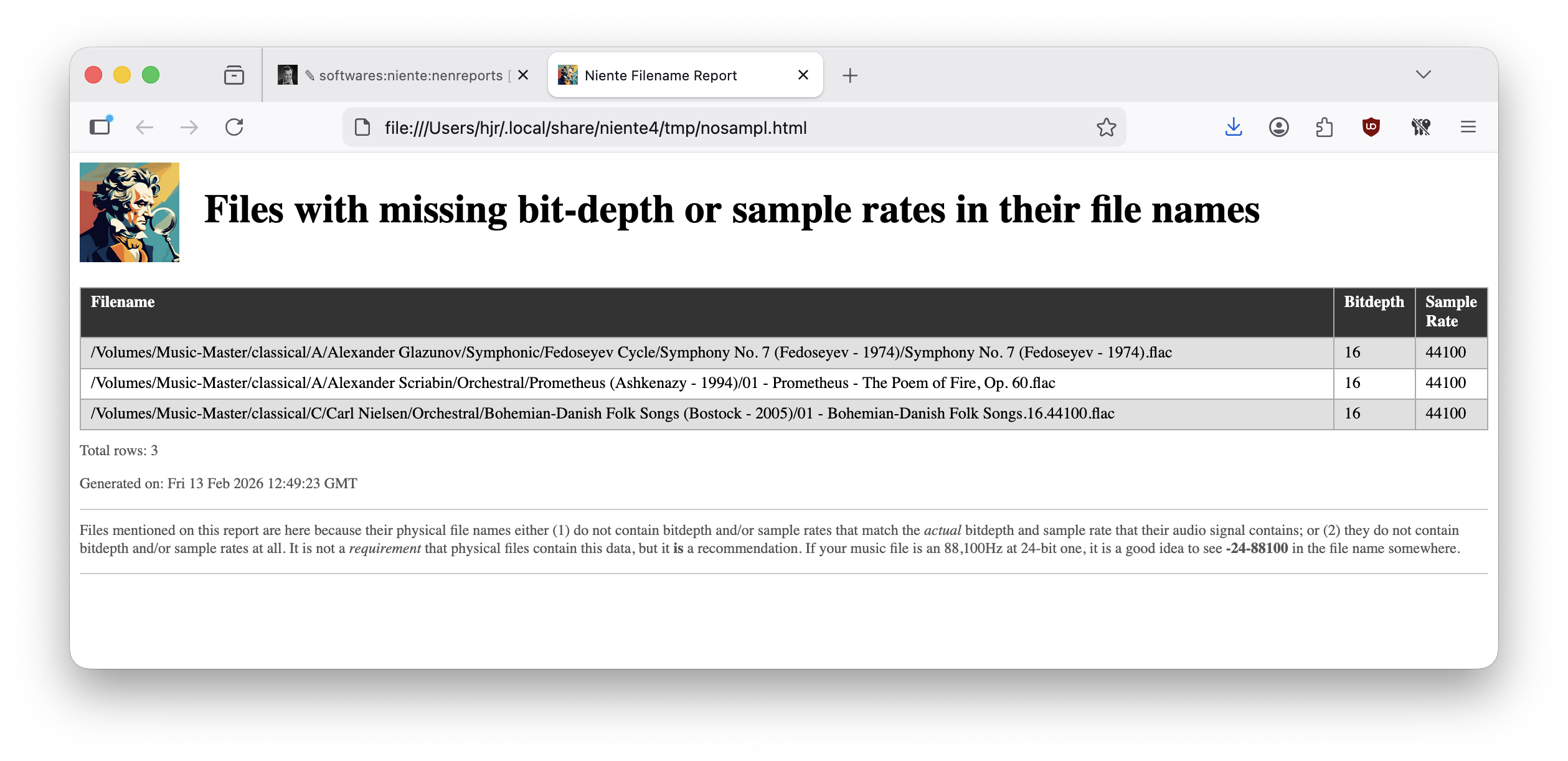
Notice that the report is very specific about the format this audio data needs to take: that third row in the report, for example, does contain a bit-depth and sample rate, but they are fullstop (period) delimited, not hyphen-delimited and that doesn't count as far as Niente is concerned!
The fix for anything listed on this report is to manually change the physical filename by hand or, perhaps, to use a tool like Semplice to auto-adjust the filename for you. So long as the two bits of audio data end up in the filename in the correct format, a fresh integrity check will have Niente noticing that these filenames now do contain the required data.
You may have absolutely no interest in naming your music files in this way, of course, in which case this report is an irrelevance for you. You may then well want to take the Administration menu, Option 1 and set the 'Report filenames without bitdepth data' to a value of “no”. That will not stop you being able to run this report. It will, however, mean that the “O4” statistic will drop off the Aggregate Statistics report: the lack of audio data in filenames will not be an issue that Niente cares to report on.
4.5 Folders with multiple physical files
A symphony will usually consist of four movements: should a recording of a symphony come with four 'tracks'? In this writer's opinion, there's only one symphony, so there should only be one physical FLAC, containing within itself all four movements. Semplice can construct such 'SuperFLACs' by merging multiple per-track FLACs into a single per-composition FLAC. This report lists examples of where that has not happened: where, in other words, there are multiple FLACs in the same folder:
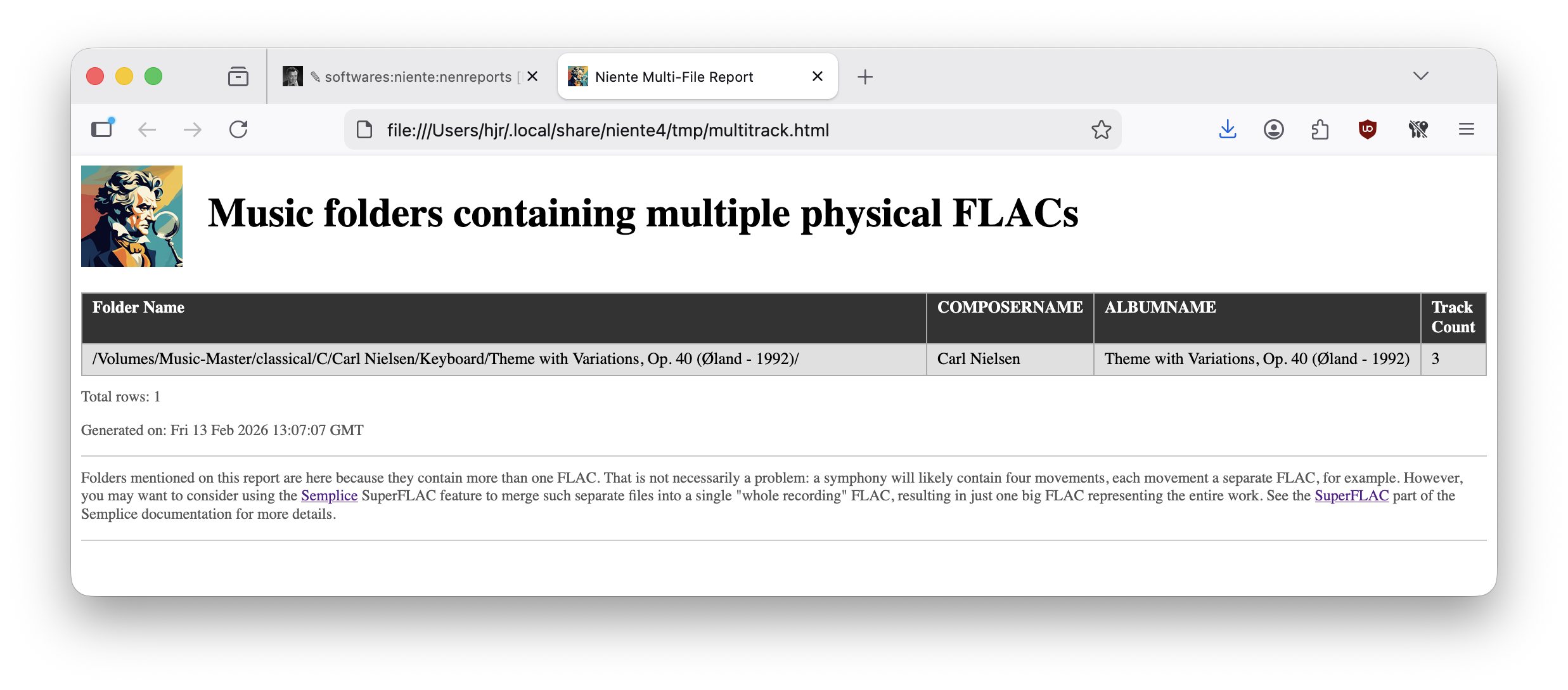
Here, for example, I would appear to have three FLACs in one folder, which I would consider a problem. Note that the ALBUM and ARTIST tags for the three FLACs would also have to be identical for the folder to appear on this report: if I had a Mozart symphony, a Beethoven Piano Concerto and a Britten opera all housed in the same folder, that would not be considered a problem (though I personally would regard that as extremely poor music collection curation!)
4.6 Possible duplicate recordings
When a FLAC file is first created, a 'digital fingerprint' of it, in the form of an MD5 hash value, is written into the very fabric of the FLAC itself. That hash value is calculated from the audio signal contained within the FLAC: it is therefore vanishly unlikely that two different FLACs will ever have the same hash value fingerprint. If they do, it is extremely probable that they are actually two copies of the same recording, regardless of the fact that their filenames, tags or other attributes might be very different:
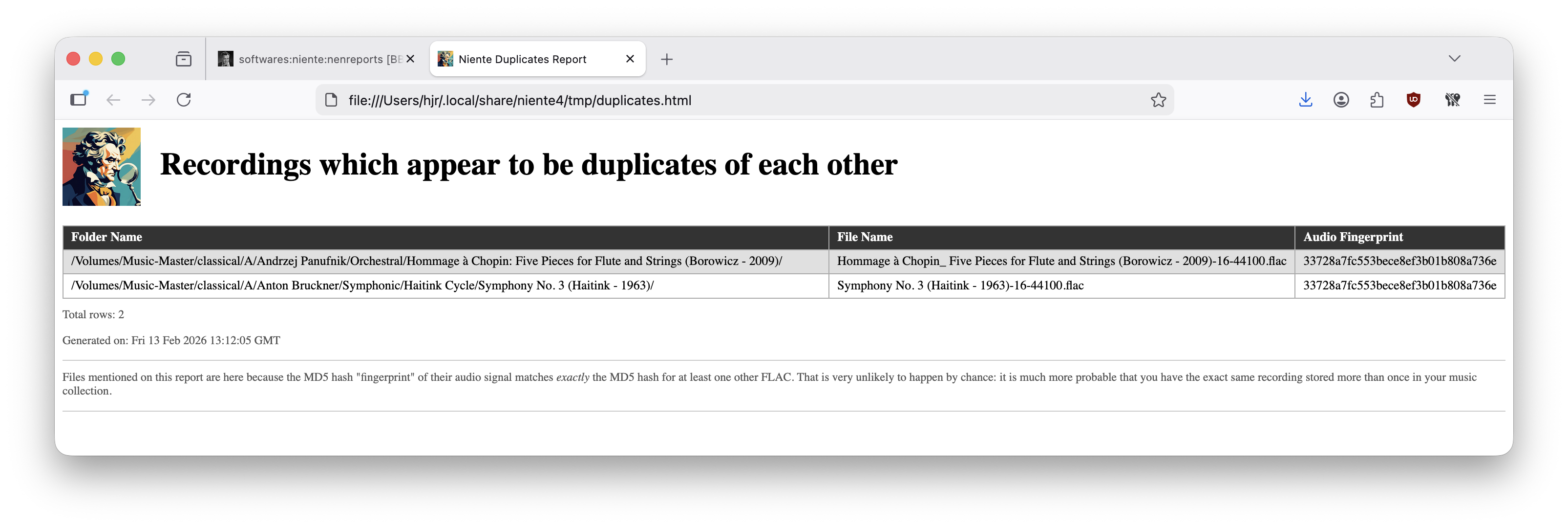
I've had this sort of thing happen to me when I've catalogued something as 'Orchestral' then later wondered whether I had a copy of it and looked under 'Symphonic'. Assuming I don't have a copy, I then purchase the recording again and catalogue the new rip under 'Symphonic'. Despite the change in GENRE tag, the audio data doesn't lie and will probably turn into the same MD5 hash value for each… and, at that point, both recordings will appear on this report.
The 'fix' for anything appearing as a possible duplicate is first to listen to the recordings, then pick a “winner”: deletion of the duplicate off your hard disk (followed by an incremental database scan and a fresh differential integrity check) will see one of the recordings removed from the Niente database and thus off this report.
4.7 Display the operations log
Every time you ask Niente to create a database or perform an integrity check, it records the fact in its Operations Log. You can view this log at any time by taking Reports Menu Option 14. It is not a particularly exciting report and I doubt you'll ever really want to run it:
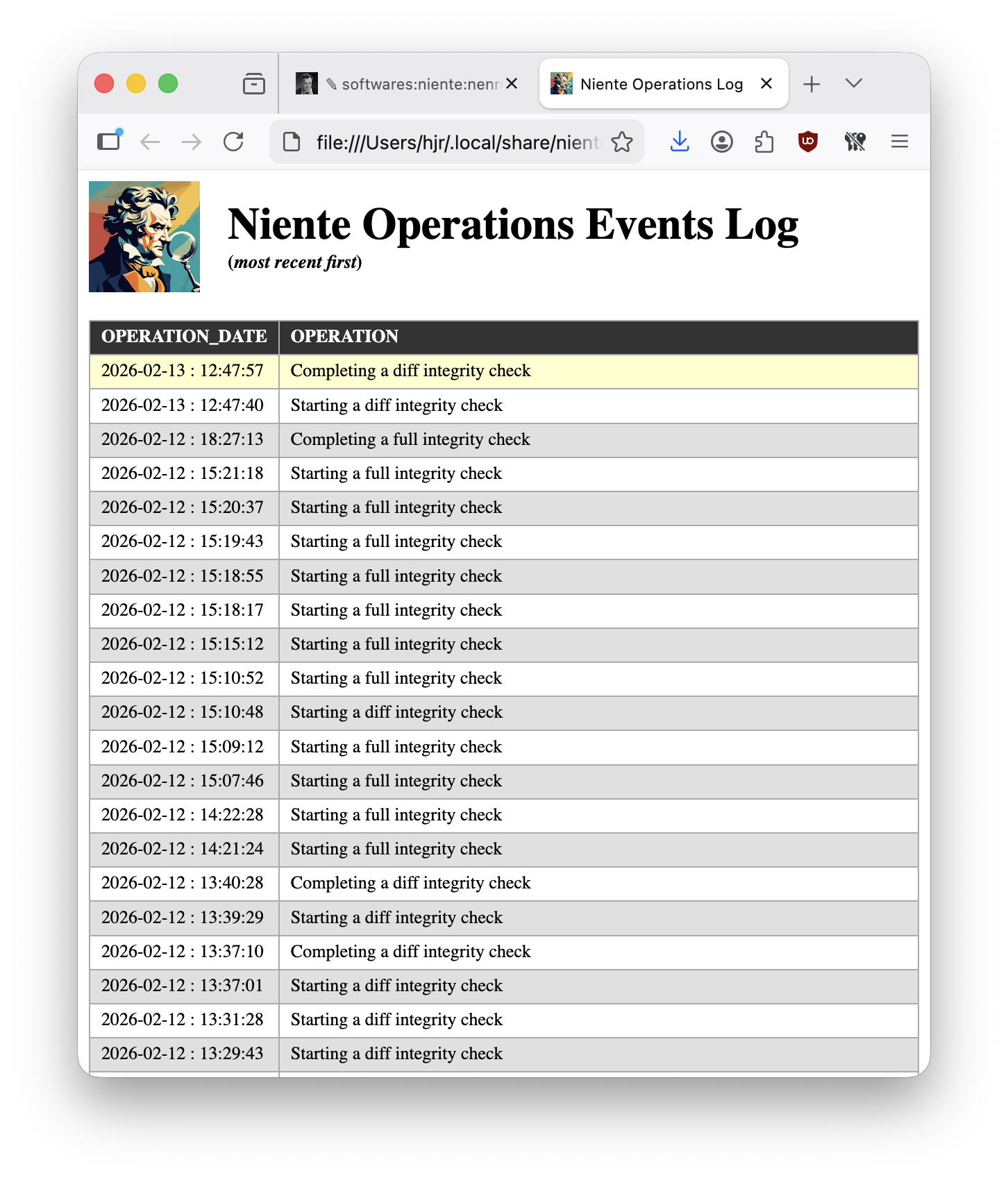
…but it's there if you want it and it can prove handy in reminding you the last time you did a full integrity check, for example: if it was a long time ago, it might be time to do a fresh one.
5.0 Conclusion
Running integrity checks of various types is certainly where Niente puts in the most work: but it's when you run reports that are driven off the database that's populated by integrity checks that Niente really becomes useful. The Quick Aggregate Summary should be your initial guide to what's going wrong with your music collection: use its various non-zero statistics to guide you to running the related reports which drill down to give your the specifics as to which FLACs are violating the rules, and how. A bunch of 'other reports' can then be used to view interesting information about your collection which maybe doesn't rise to the level of a physical or logical error as such, but may still be something you'd like to fix up anyway.
If you subscribe to this website's promoted ways to tag classical music, a bunch of tag-related reports will prove useful in making sure you stick to the 'rules'. If you don't, then there are still plenty of reports which you should find of use and interest.
| Back to Software Home | Back to Niente Documentation Home | Database Menu | Intergrity Checks Menu | Reporting Menu |